In today’s booming era of AI applications, we often need to feed documents of all formats to large models for analysis, summarization, or Q&A. Yet a common challenge is: how can we make AI truly understand our document content? And Microsoft’s open-source MarkItDown tool was born to solve exactly this core problem.
What Is MarkItDown?
MarkItDown is a lightweight Python tool open-sourced by Microsoft, specifically for converting various file formats into Markdown. It supports a very wide range of file types:
- Office documents: Word, PowerPoint, Excel
- PDF files
- Images: Supports extracting EXIF metadata and OCR text recognition
- Audio files: Supports speech-to-text and metadata extraction
- Web content: Specially optimized for sites like Wikipedia
- Other text formats: CSV, JSON, XML, etc.
- Even supports: ZIP files, YouTube URLs, EPubs, etc.
Unlike traditional document conversion tools, MarkItDown was designed from the ground up to serve AI applications, especially the analysis needs of large language models (LLMs).
Why Convert to Markdown?
Before diving into MarkItDown’s advantages, we need to understand why the Markdown format is so AI-friendly:
1. Simplicity and Clarity
LLMs perform best in a clean environment. Markdown provides clear visual and structural separation between headings, lists, and paragraphs. When an LLM sees # Heading, it knows a new section has begun. This simplicity reduces ambiguity and helps the model understand what matters and how to respond.
2. Structured Data Representation
Markdown allows nested lists, tables, and subheadings to show information hierarchy or categories. This hierarchy is gold for LLMs; it tells the model how concepts relate to one another - what the main idea is, what the sub-points are, and what list of items needs to be extracted or reasoned about.
3. Enhanced Token Efficiency
Tokens are the currency of LLMs. Every word, punctuation mark, or even formatting tag can consume precious tokens in a prompt. Markdown is lighter than JSON, XML, or HTML; it conveys meaning with fewer characters, which means more room for meaningful data and less redundancy. More context means better answers - and lower cost when paying per token.
4. Improved Prompt Formatting
Markdown makes prompt formatting clearer. You can create separated sections with headings, add bullet points to reduce noise, and use code blocks to highlight technical examples. This gives the LLM visual cues to organize its thinking - just as it does for human readers.
MarkItDown’s Advantages for AI Applications
Based on the characteristics of Markdown above, MarkItDown shows the following key advantages in AI applications:
1. Unstructured to Structured Data
MarkItDown can convert a variety of unstructured documents into structured Markdown, enabling AI to better understand the document’s organizational structure and content hierarchy. This is essential for document analysis, content extraction, and knowledge building.
2. Improved AI Comprehension Accuracy
By preserving the document’s original structure (such as headings, lists, tables, etc.), MarkItDown helps AI understand document content more accurately, reducing misunderstanding and misinterpretation.
3. Optimized RAG System Performance
In Retrieval-Augmented Generation (RAG) systems, the quality of document parsing directly affects retrieval and generation results. MarkItDown’s high-quality structured output can significantly improve RAG system performance.
4. Support for Multimodal Content Processing
MarkItDown not only supports text documents, but can also handle image and audio files, and can integrate multimodal LLMs like GPT-4o for image description and speech transcription, achieving true multimodal content understanding.
5. Unified Format Simplifies the Processing Pipeline
No matter what format the input document is, MarkItDown outputs a unified Markdown format, greatly simplifying downstream AI processing and reducing the workload of format adaptation.
Real Comparison Case: Traditional Processing vs MarkItDown
To show MarkItDown’s advantages more intuitively, let’s look at a real case. This is a scenario encountered when developing an AI email assistant:
Problem Background
The developer needed to build an AI email assistant that could process various documents uploaded by users (PDF, Word, Excel, etc.) and answer questions about their content. Initially, the developer used a custom document processor (built on PyPDF2, python-docx, and pandas); although it extracted text perfectly, the AI performed poorly when answering questions.
Output of the Traditional Processor
When a user asked “What was Q4 revenue?”, the traditional processor’s output was as follows:
| |
Technically correct, but semantically useless to the AI. The table became an unreadable block of text, document headings lost their hierarchy, and the vector store could not understand content relationships.
Output of MarkItDown
After processing the same document with MarkItDown, the output was as follows:
| |
Comparison Result
The difference is striking! Through actual testing, using MarkItDown brought the following improvements:
Search relevance up 34%
- Query: “What was Q4 revenue?”
- Traditional processor: found the text but lost the table context
- MarkItDown: found a structured table with clear numeric data
- Result: answer accuracy improved by 34%
Chunking quality up 28%
- Traditional processor: arbitrary text splitting
- MarkItDown: structure-aware splitting that preserves headings and tables
- Result: chunk consistency score improved by 28%
This case clearly shows how MarkItDown, by preserving document structure, significantly improves AI’s ability to understand document content.
MarkItDown’s Technical Advantages
Beyond the application advantages above, MarkItDown is also unique at the technical level:
1. Designed for LLMs
Unlike traditional document conversion tools, MarkItDown considered the needs of LLMs from the very beginning, focusing on preserving document structure and content relationships rather than merely extracting text.
2. LLM Integration Capability
MarkItDown can integrate multimodal LLMs like GPT-4o for image description and speech transcription, enabling deeper content understanding and analysis.
3. Plugin Extension System
Supports third-party plugins, allowing features to be extended for specific needs, enhancing the tool’s flexibility and adaptability.
4. Multiple Deployment Options
Supports command line, Python API, and Docker deployment, and can be easily integrated into various AI applications and workflows.
Practical Application Scenarios
MarkItDown is especially valuable in the following AI application scenarios:
1. Enterprise Knowledge Base Construction
Convert various internal document formats into structured Markdown to build an AI-understandable knowledge base supporting intelligent Q&A and content retrieval.
2. RAG System Development
Serve as the document pre-processing tool for a RAG system, providing high-quality input data and improving retrieval and generation results.
3. Document Automation Processing
Automatically process large volumes of documents, extract key information, and generate summaries or reports, reducing manual work.
4. Multimodal Content Analysis
Combine image and audio processing capabilities to achieve comprehensive analysis and understanding of multimedia content.
5. AI Assistant Development
Provide AI assistants with structured document understanding capabilities, enabling them to accurately answer questions about document content.
How to Get Started with MarkItDown?
Using MarkItDown is very simple; just a few steps:
Installation
| |
Basic Usage
| |
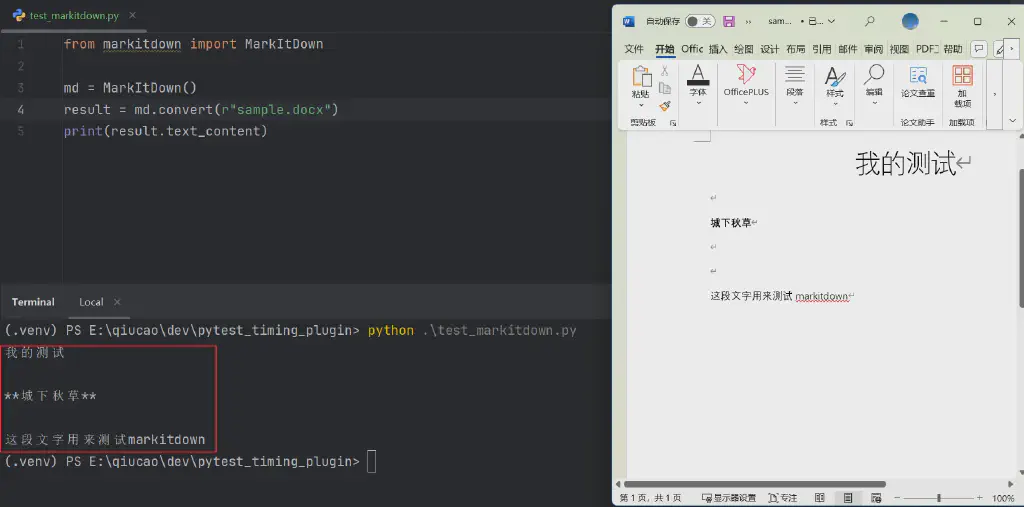
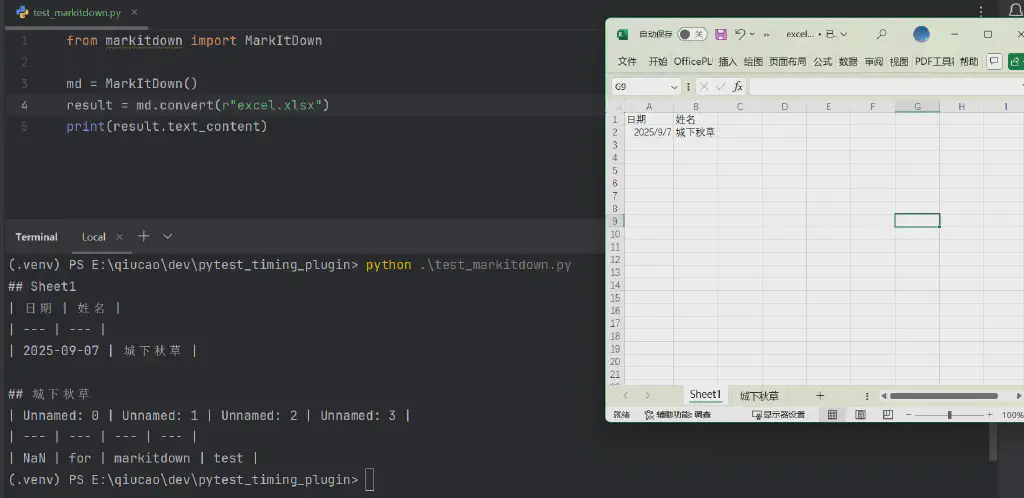
Processing Excel Spreadsheets
| |
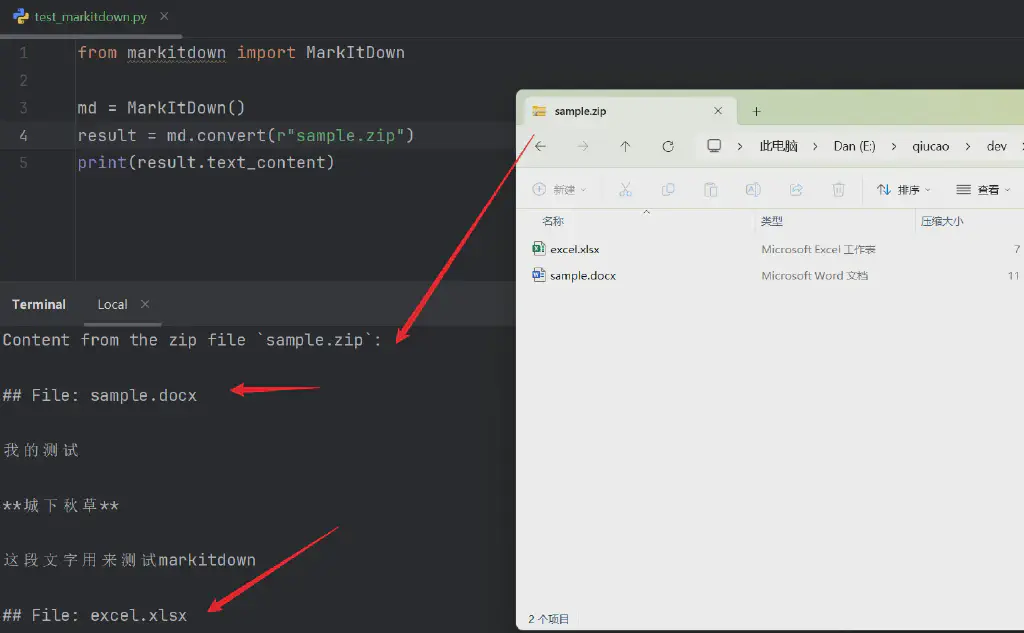
Batch Processing of Compressed Files
| |
Conclusion
In AI applications, “garbage in, garbage out” is a golden rule. By converting documents of various formats into structured Markdown, MarkItDown provides AI with high-quality, easy-to-understand input data, significantly improving AI’s ability to understand document content.
Whether you are building a RAG system, developing an AI assistant, or doing document automation, MarkItDown is a powerful tool worth trying. It not only solves the challenge of document format diversity, more importantly, by preserving document structure, it lets AI truly “understand” our document content.
As AI applications continue to evolve, tools like MarkItDown will play an increasingly important role in connecting human knowledge with AI capabilities. If you are developing an AI application, especially one that needs to process large volumes of documents, why not try MarkItDown and experience the qualitative leap it brings to your AI application.