Preface
In testing work, finding Bugs and reporting Bugs are daily routine, and it is inevitable to argue with developers about whether a certain issue is a Bug.
Although it is normal for different people to disagree on the identification of a Bug because of different perspectives.
But in the process of testing a product, we really cannot treat all the problems and issues found as Bugs. Bug is actually a fairly general term; some companies also call a Bug report a “fault ticket” or “issue ticket”, which strictly speaking is not accurate either. Because conceptually, Bug has quite a few close relatives that are similar in function and meaning but actually different. In this article we will sort out and clarify the different concepts of Bug and these relatives, and their relationship with our work.
Fault
Fault is often equated with Bug in daily work, but strictly speaking, a fault refers to a static defect in software code or design, such as an incorrect step, process, or data definition.
In other words, it is more of an “internal” problem of the software, usually the manifestation of a human error made by the developer in the software.
Because it is more static, faults are usually exposed during code review or static analysis.
Case
For example, in the following Java code, when handling a boundary value, i>=0 is written as i>0, which causes the first element to be skipped during traversal. This is a fault.
| |
Or, for the calculation of a user’s age, failing to account for February 29 in a leap year leads to an incorrect result; this is also a fault.
Error
Error refers to a human mistake, error in judgment, or deviation in decision made by a developer or other participant (such as a requirements analyst or designer) during software development. Errors are usually the root cause of other problems downstream; their occurrence is mainly caused by human factors, such as a deviation in requirements understanding, a logic slip, or a typo in code.
Case
Although an error is “human-made”, the types of errors that occur can generally be summarized into a limited number of categories, which can also better help testers identify risks when they participate early. For example:
- Logic error: When writing code, the developer’s implementation of an algorithm or business logic does not match expectations, such as the incorrect application of an algorithm formula.
- Syntax error: The code does not comply with the syntax rules of the programming language. Although modern IDEs can catch most syntax errors, some syntax or configuration errors that only appear at runtime can still occur.
- Requirements misunderstanding error: The understanding of a requirement deviates from the real requirement, so the implemented feature is not what the user truly needs. For example, for the requirement “sort by order size”, the developer implements sorting by order amount, but the user actually wants sorting by the number of items in the order.
- Concurrency error: For example, in a multithreaded or distributed system, access to shared resources is not properly synchronized, leading to data inconsistency or deadlock.
Defect
Defect refers to any flaw or imperfection in a software product that deviates from requirements or expected behavior.
It is a broad term, usually referring to any behavior or result found in software that does not meet expectations. In most cases, what we call a Bug is actually a defect.
A defect can also be understood as the external manifestation of a fault.
Case
- The user correctly enters the account and password, but the login fails or does not redirect properly.
- The login page has no security protection, allowing unlimited retries to brute-force the account and password.
- The login error message is too detailed, leaking sensitive information.
All of the above are typical functional or security defects.
Failure
Failure refers to a software system or component being unable to perform the function it should, exhibiting external behavior at runtime that does not match expectations, a functional deviation directly observable by the user.
The difference between it and a defect is that not all defects or faults lead to a failure; only when a defect is “activated” does it manifest as a failure.
Case
- When a user performs a specific operation (such as uploading a large file), the application suddenly exits or the server stops responding. This may be due to a defect such as a memory leak that, under long running time or high load, causes resource exhaustion and ultimately a system failure.
- After a user successfully submits a form, the data is not correctly saved to the database, resulting in partial data loss. This may be a failure caused by a defect in the database operation logic.
The Causal Chain
The four different kinds of problems above actually form the following causal chain:

They can be summarized in the table below:
| Concept | Definition | Nature | Phase of Occurrence | Example | Relationship |
|---|---|---|---|---|---|
| Error | Human mistakes, errors in judgment, or deviations in decision during development | Human behavior | Requirements, design, coding phases | Wrong algorithm; deviation in requirements understanding; typo | Leads to fault |
| Fault | Incorrect steps, processes, or data definitions introduced by an error and existing in code or documentation | Static code problem | Coding, testing phases | Wrong logic for calculating age in a leap year; unhandled null pointer | When activated leads to failure |
| Defect | Any flaw in a software system that deviates from its specification, requirements, or expected behavior | Behavioral deviation | Testing, production phases | Login feature unusable; inaccurate report data | Is the external manifestation of a fault and needs fixing once found |
| Failure | A software system or component unable to perform its required function, or exhibiting observable incorrect behavior | Observable consequence | Production phase (or found in testing) | System crash; data loss; interruption of a critical business flow | Is the final result of a defect/fault being activated |
Exception
An exception is a special event at program runtime that interrupts the normal flow of instructions. It is usually triggered by a code logic error, bad external input, or a system resource problem.
An exception does not necessarily lead to a fault, because an exception can be caught and handled in code with try ... catch.... It is a normal part of how software deals with various unconventional scenarios.
Case
The following code is an example of Python handling network connection exceptions, where the network connection state, timeouts, and so on are caught in code and protected with a retry mechanism.
| |
Issue
Anyone who has used Jira or often visits github should be familiar with Issue. Issue is actually a general term; it refers to any matter or obstacle that needs attention, discussion, and tracking to resolution.
Very often, an Issue is used as a work item (workItem). So the “issue” here has a meaning far broader than the narrow sense of defect or error; an issue is not a Bug, it is a matter to be tracked and followed continuously.
Case
- In performance testing, we find that as the number of users increases, the system response time becomes noticeably longer and the user reconnection mechanism is triggered more often. This phenomenon does affect user experience, but the behavior is actually within the system design expectations, so it cannot be considered a defect; it is more appropriately recorded as an Issue for continued tracking and observation.
- During a requirements review, some requirements have ambiguous interpretations. For example, a reporting requirement, “count the number of orders within a month”. The time expression here is actually not precise enough - are orders within a month counted by order creation time or by order completion time? Such matters awaiting clarification are also
issues, notdefects.
Risk
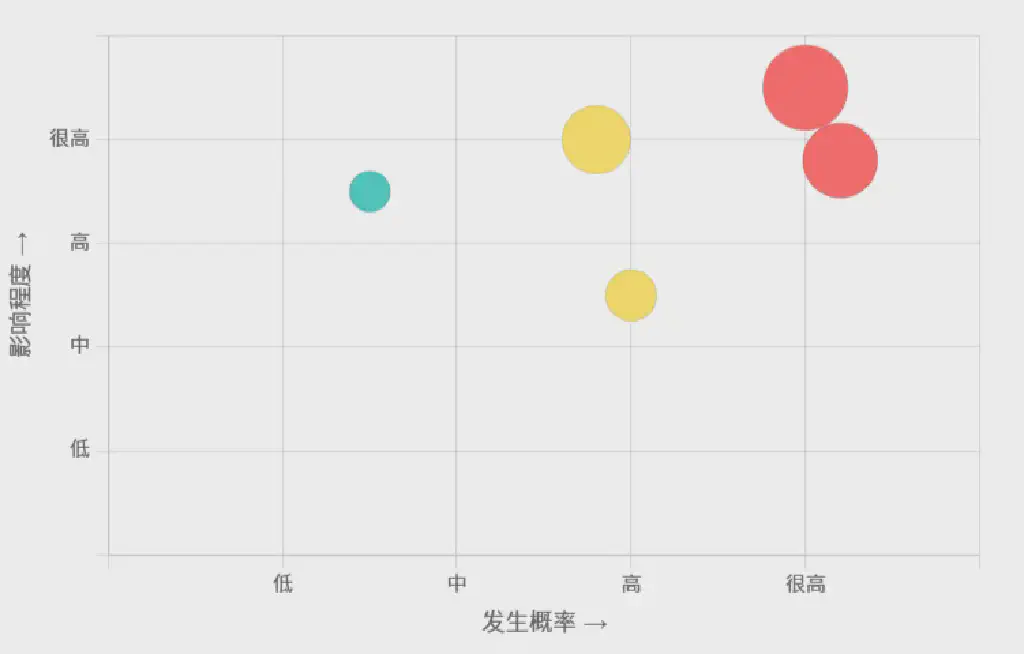
Risk is an uncertain event that may occur and have a negative impact on project objectives (such as quality, cost, schedule, and scope).
Compared with the items above, which mainly face the product, risk faces the project more.
It mainly includes two dimensions: the probability of the risk occurring + the impact of the risk (severity).
Besides the quality risks of the product itself, there are also management risks of project operation.
Case
- Product operation depends on the integration of a third-party module, but when integration testing begins, the third-party module has not yet finished development, thus creating a schedule risk for this product.
- During product development, major changes to requirements or the design solution occur, leading to delivery risk.
- A core developer or tester on the team leaves, creating a risk to the project plan.
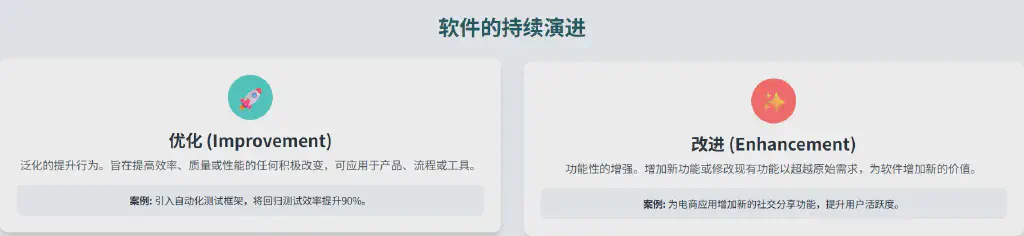
Besides the items above, there is another category of new ideas and adjustment items during the continuous evolution of the software itself. These also cannot be considered Bugs, but having them at product release is the icing on the cake. These items fall into two cases: optimization and enhancement.
Improvement
Improvement is an enhancement to an existing feature or process that does not involve new features or Bug fixes, such as improving performance, maintainability, or user experience.
The emphasis is on improvement on top of the original basis. It is not necessarily limited to the product’s own features; development processes and tool usage can also be included.
Case
- Actively introduce an automated testing framework to improve regression testing efficiency.
- Optimize the page UI design of the current system to achieve better visual effects.
Enhancement
Enhancement is adding a new feature to the software or extending the capability of an existing feature. It is usually driven by user or business needs.
An enhancement is an expansion and sublimation of the original requirements by adding new features.
In testing, whether an issue is a defect, an optimization, or an enhancement is often a point where disputes easily arise.
Actually the difference in nature between a defect and an enhancement is:
- The fix of a
defectis corrective, intended to make the software “correct” and reduce quality risk - The implementation of an
enhancementis evolutionary, intended to make the software “better” and increase its value
Case
- An e-commerce system increases user stickiness by adding a social sharing feature.
- An enterprise management system adds a reporting feature that provides sales data analysis to support decision-making.
Conclusion
By analyzing the nine core concepts related to Bugs - fault, defect, issue, error, exception, failure, risk, improvement, and enhancement -
we can describe problems more accurately, communicate with developers more effectively, and understand more clearly the role of our output in the quality system.