
Introduction
Anyone who has developed Python programs or written automation scripts in Python knows how important logging is to a program. Python has a built-in standard library for logging, logging, but this library is relatively complicated to use.
In this article we introduce a currently very popular third-party logging framework, Loguru, which has over 22K stars on GitHub. It is a more intuitive and easier-to-use alternative to logging. Developers can focus on business logic instead of the tedious details of logging configuration.
Using Loguru
1. Installation and Quick Start
The simplest way to use it:
1
2
3
| from loguru import logger
logger.debug("Happy logging with Loguru!")
|
Output:
1
| 2025-08-01 14:00:51.069 | DEBUG | __main__:<module>:3 - Happy logging with Loguru!
|
2. Log Levels
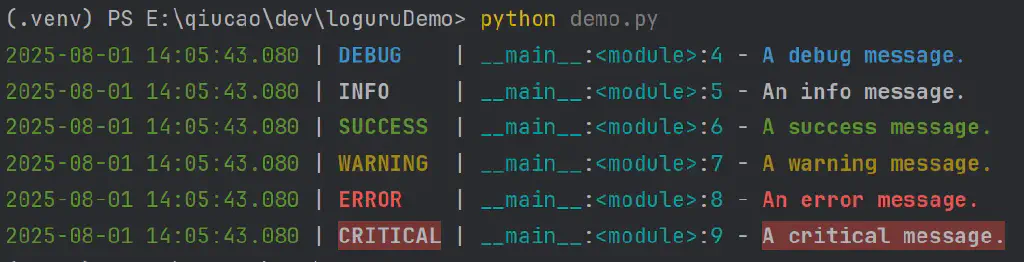
Loguru provides 7 built-in log levels and sets a different default color for each level:
| Level | Method | Value | Purpose |
|---|
| TRACE | logger.trace() | 5 | Extremely detailed debug information |
| DEBUG | logger.debug() | 10 | Development debugging information |
| INFO | logger.info() | 20 | General information |
| SUCCESS | logger.success() | 25 | Success operation notification |
| WARNING | logger.warning() | 30 | Warning information |
| ERROR | logger.error() | 40 | Error information |
| CRITICAL | logger.critical() | 50 | Critical error |
Example code:
1
2
3
4
5
6
7
8
9
| from loguru import logger
logger.trace("A trace message.")
logger.debug("A debug message.")
logger.info("An info message.")
logger.success("A success message.")
logger.warning("A warning message.")
logger.error("An error message.")
logger.critical("A critical message.")
|
Output:
3. Custom Log Levels
It is also extremely convenient to create custom levels with loguru, for example, creating a FATAL level log:
1
2
3
4
5
| from loguru import logger
# create a custom level
logger.level("FATAL", no=60, color="", icon="!!!")
logger.log("FATAL", "A fatal error occurred.")
|
Advanced Usage
1. Log Handler Configuration
Loguru uses the add() method to add handlers:
 1
 2
 3
 4
 5
 6
 7
 8
 9
10
| import sys
from loguru import logger
# remove the default handler
logger.remove()
# add a custom handler
logger.add(sys.stderr, level="INFO", format="{time:YYYY-MM-DD HH:mm:ss} | {level} | {message}")
logger.log("INFO","Configuration complete, start logging")
|
2. File Logging
 1
 2
 3
 4
 5
 6
 7
 8
 9
10
11
12
13
14
15
| from loguru import logger
# basic file logging
logger.add("app.log", rotation="500 MB", retention="10 days", compression="zip")
# advanced file logging configuration
logger.add(
"app_{time:YYYY-MM-DD}.log",
rotation="00:00", # rotate at midnight every day
retention="30 days", # keep for 30 days
compression="gz", # compression format
level="INFO"
)
logger.info("Just testing the log")
|
After execution, according to the code you will get two log files, app.log, app_2025-08-01.log
 1
 2
 3
 4
 5
 6
 7
 8
 9
10
11
12
13
14
15
16
17
18
19
20
21
22
23
24
| import sys
from loguru import logger
logger.remove()
# custom format
logger.add(
sys.stderr,
format="<green>{time:YYYY-MM-DD HH:mm:ss}</green> | "
"<level>{level: <8}</level> | "
"<cyan>{name}</cyan>:<cyan>{function}</cyan>:<cyan>{line}</cyan> | "
"<level>{message}</level>"
)
# you can also use a function for dynamic formatting
def custom_formatter(record):
if record["level"].no >= 40: # ERROR and above
return "{time} | {level} | {thread} | {message}\n{exception}"
else:
return "{time} | {level} | {message}\n{exception}"
logger.add(sys.stderr, format=custom_formatter)
logger.info("Just testing the log")
|
This will produce output defined as follows:

4. Log Filtering
 1
 2
 3
 4
 5
 6
 7
 8
 9
10
11
12
13
| from loguru import logger
# filtering by level
def level_filter(level):
def is_level(record):
return record["level"].name == level
return is_level
logger.add(sys.stderr, filter=level_filter(level="WARNING"))
# filtering by module
logger.add("app.log", filter="my_module") # only log from my_module
logger.add("error.log", filter=lambda record: record["level"].no >= 40) # only errors and above
|
loguru supports JSON-format serialized output by default
1
2
3
4
5
6
| from loguru import logger
# JSON format logging
logger.add(sys.stderr, serialize=True)
logger.info("Just testing the log")
|
This gives the following output:
1
| {"text": "2025-08-01 14:25:44.560 | INFO | __main__:<module>:8 - Just testing the log\n", "record": {"elapsed": {"repr": "0:00:00.00 "seconds": 0.003698}, "exception": null, "extra": {}, "file": {"name": "demo.py", "path": "E:\\qiucao\\dev\\loguruDemo\\demo.py"}, "function": "<module>", "level": {"icon": "ℹ️", "name": "INFO", "no": 20}, "line": 8, "message": "Just testing the log", "module": " "name": "__main__", "process": {"id": 4580, "name": "MainProcess"}, "thread": {"id": 5680, "name": "MainThread"}, "time": {"repr": "2025-08-01 14:25:44.560271+08:00", "timestamp": 1754029544.560271}}}
|
6. Exception Handling and Debugging
 1
 2
 3
 4
 5
 6
 7
 8
 9
10
| from loguru import logger
# control diagnostic information (should be set to False in production)
logger.add("app.log", diagnose=False)
# automatically catch exceptions
try:
result = 1 / 0
except ZeroDivisionError:
logger.exception("Division by zero occurred")
|
loguru can catch exceptions directly; here the diagnose parameter also automatically records local variable information when an exception is caught, making it easier for us to debug (in production it generally needs to be set to False)
Summary
The above is a summary of the usage of the loguru library, which is excellent in terms of simplicity of configuration, richness of features, and support for custom extension and debugging.
So, when writing Python to handle logs, start using it right away~~
Using loguru in pytest - Problems and Solutions
Introduction
In the previous article, we recommended a third-party Python logging library, loguru, which is very simple to use and fully featured. See that article 【】
But for those of us doing test automation who often use the pytest framework, there is a small problem. The built-in log capture mechanism of Pytest is optimized on top of the standard library logging. So when we use the pytest framework, if pytest’s own logging mechanism is involved - that is, pytest’s built-in fixture caplog actually still uses the standard logging module - the logs defined by the loguru library are difficult to take effect.
Of course, the problem is not big. In this article we briefly discuss this problem and introduce a compatibility solution.
caplog in Pytest
First let’s introduce Pytest’s logging.
caplog is a built-in fixture provided by pytest for capturing and testing log output.
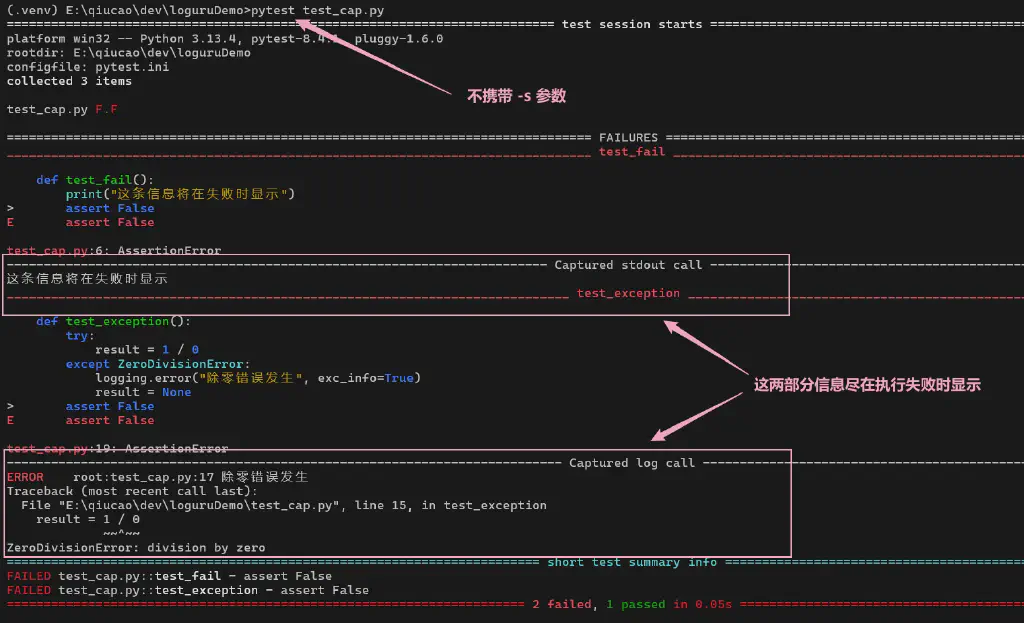
Because of this built-in plugin, when we run pytest tests, by default standard output and log information recorded by the logging module are only shown when a test case fails.
For example, the following code:
 1
 2
 3
 4
 5
 6
 7
 8
 9
10
11
12
13
14
15
16
17
18
19
20
| # test_cap.py
import logging
def test_fail():
print("This message is shown on failure")
assert False
def test_pass():
print("This message is not shown on success")
assert True
def test_exception():
try:
result = 1 / 0
except ZeroDivisionError:
logging.error("Division by zero occurred", exc_info=True)
result = None
assert False
|
Running normally through pytest, we will see output like this:
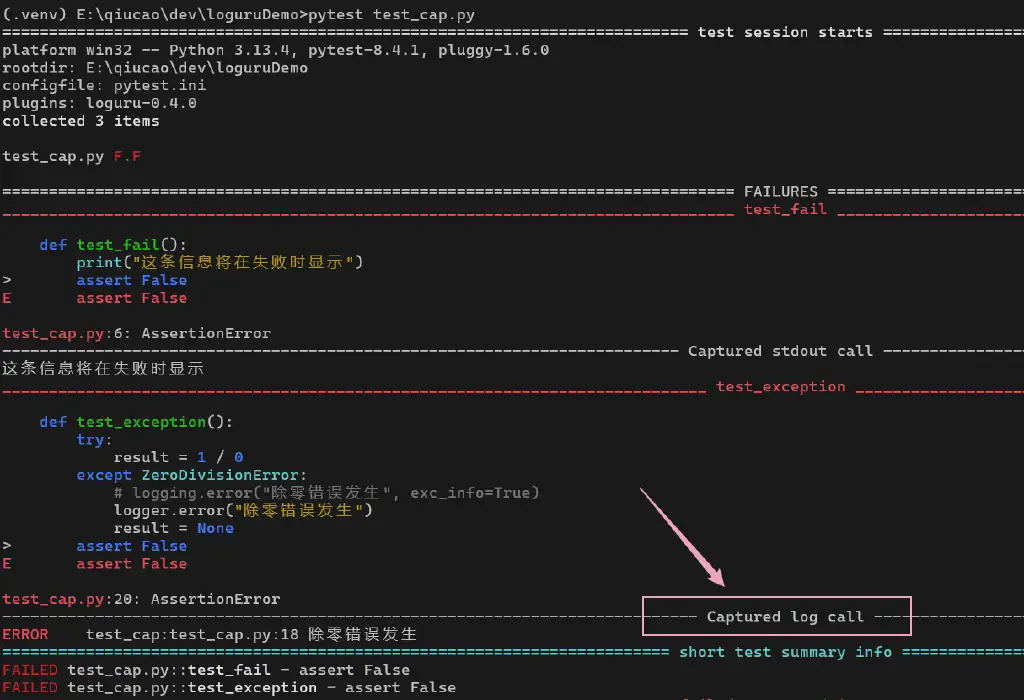
And if we change the logging part above to use loguru’s logging style:
1
2
3
4
5
6
7
8
| def test_exception():
try:
result = 1 / 0
except ZeroDivisionError:
# logging.error("Division by zero occurred", exc_info=True)
logger.error("Division by zero occurred")
result = None
assert False
|
Running it, we can see the difference:
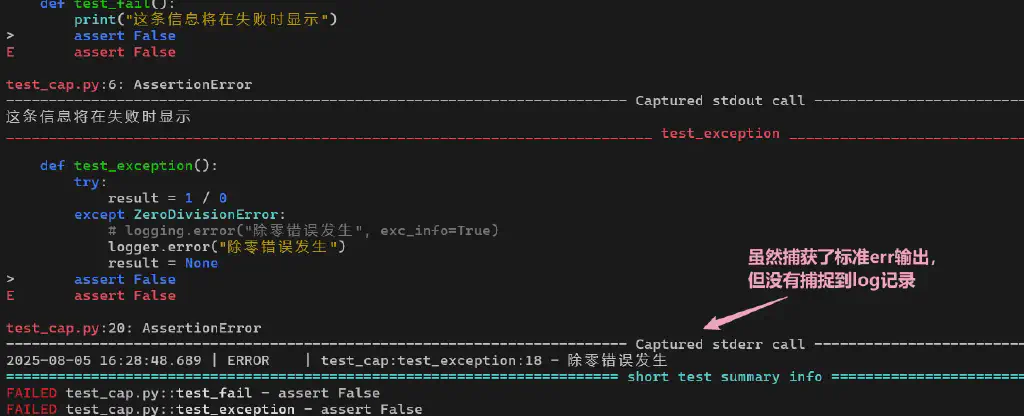
That is, logs recorded by loguru cannot be captured by Pytest’s caplog.
Naturally this means we cannot use some APIs provided by caplog such as caplog.text, caplog.records, which creates some obstacles for us to make flexible use of pytest.
Solving the Compatibility Problem
There are multiple solutions to this compatibility problem; here I share what I verified.
Solution 1: pytest-loguru
When a problem exists, of course we can first check whether the community has an existing solution, and we find that someone has already provided one. It is the pytest-loguru plugin.
Just install it with the following command:
pip install pytest-loguru
But in my actual test, I found it reports a handle error on Windows systems.
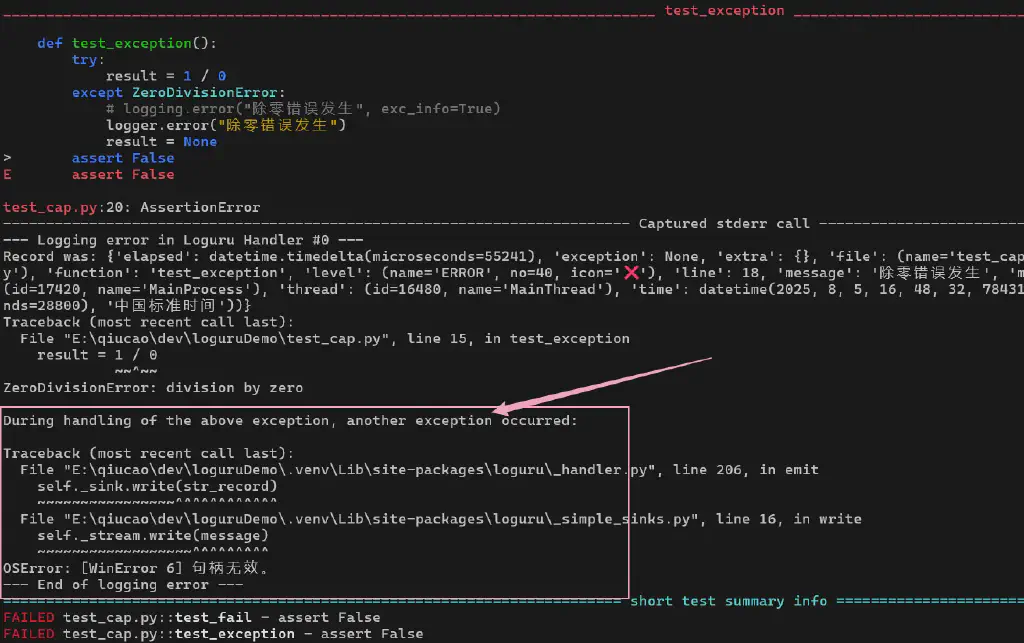
So here I recommend using solution two.
Solution 2: Redirect loguru log output to standard logging output
We can use pytest’s conftest.py configuration script and the following code to redirect loguru logs to logging:
 1
 2
 3
 4
 5
 6
 7
 8
 9
10
11
12
13
14
15
16
17
18
19
20
21
22
23
24
25
26
27
28
29
30
31
32
33
34
35
36
37
38
39
40
41
42
43
44
45
46
47
48
49
50
51
52
53
54
55
56
57
| # conftest.py
import pytest
import logging
from loguru import logger
class SafePropagateHandler(logging.Handler):
def __init__(self):
super().__init__()
# ensure there is a basic formatter
self.setFormatter(logging.Formatter('%(levelname)s - %(message)s'))
def emit(self, record):
try:
# get the standard logging logger
std_logger = logging.getLogger(record.name)
# ensure the logger has a handler
if not std_logger.handlers:
# add a null handler to avoid "No handlers" warning
std_logger.addHandler(logging.NullHandler())
# handle the record safely
std_logger.handle(record)
except Exception:
# if propagation fails, ignore silently to avoid affecting the test
pass
@pytest.fixture(scope="session", autouse=True)
def setup_safe_loguru_integration():
# remove Loguru's default handler
logger.remove()
safe_handler = SafePropagateHandler()
# add the propagation handler to Loguru
handler_id = logger.add(
safe_handler,
format="{message}", # simplify format to avoid duplication
level="DEBUG",
backtrace=False,
diagnose=False,
catch=True # catch exceptions in the handler
)
# configure standard logging to avoid conflicts
logging.basicConfig(
level=logging.INFO,
format='%(levelname)s - %(message)s',
handlers=[logging.NullHandler()]
)
yield
# cleanup
logger.remove(handler_id)
|
Running again, we can see that caplog can now correctly capture logs recorded by loguru.
More on Python’s logging library loguru - A Full Comparison with the Standard Library logging
In earlier articles, we recommended Python’s third-party logging library loguru, mainly introducing loguru’s basic usage. In this article we compare it in detail with the standard library logging from multiple angles, to understand its advantages more intuitively.
Configuration Complexity Comparison
Python standard logging configuration:
 1
 2
 3
 4
 5
 6
 7
 8
 9
10
11
12
13
14
15
16
17
18
19
20
21
22
23
24
25
26
27
28
| import logging
# standard logging requires multiple configuration steps
logger = logging.getLogger(__name__)
logger.setLevel(logging.DEBUG)
# create a console handler
console_handler = logging.StreamHandler()
console_handler.setLevel(logging.INFO)
# create a file handler
file_handler = logging.FileHandler('app.log')
file_handler.setLevel(logging.DEBUG)
# create formatters
console_formatter = logging.Formatter('%(asctime)s - %(name)s - %(levelname)s - %(message)s')
file_formatter = logging.Formatter('%(asctime)s - %(name)s - %(levelname)s - %(filename)s:%(lineno)d - %(message)s')
# set the formatters
console_handler.setFormatter(console_formatter)
file_handler.setFormatter(file_formatter)
# add the handlers
logger.addHandler(console_handler)
logger.addHandler(file_handler)
# only now can we start using it
logger.info("Configuration complete, start logging")
|
Loguru’s configuration:
1
2
3
4
5
6
7
| from loguru import logger
# Loguru accomplishes the same thing in one line
logger.add(sys.stdout, level="INFO", format="{time} - {name} - {level} - {message}")
logger.add("app.log", level="DEBUG", format="{time} - {name} - {level} - {file}:{line} - {message}")
logger.info("Configuration complete, start logging")
|
Advantage comparison:
- Standard logging: Needs multiple objects such as logger, handler, formatter to be created and configured in multiple layers
- Loguru: All configuration is done through a simple
add() method, reducing code by more than 70%
API Simplicity Comparison
Python standard logging API:
 1
 2
 3
 4
 5
 6
 7
 8
 9
10
11
12
13
14
15
16
17
18
| import logging
# need to import multiple modules and classes
import logging.handlers
import logging.config
# different levels need different method calls
logger.debug("Debug message")
logger.info("Info message")
logger.warning("Warning message")
logger.error("Error message")
logger.critical("Critical message")
# exception logging needs separate handling
try:
1 / 0
except Exception as e:
logger.error("An error occurred", exc_info=True)
|
Loguru’s API:
 1
 2
 3
 4
 5
 6
 7
 8
 9
10
11
12
13
14
15
16
| from loguru import logger
# unified API, more intuitive method names
logger.trace("Trace message") # more detailed than debug
logger.debug("Debug message")
logger.info("Info message")
logger.success("Success message") # unique success level
logger.warning("Warning message")
logger.error("Error message")
logger.critical("Critical message")
# exception logging is extremely simple
try:
1 / 0
except Exception:
logger.exception("An error occurred") # automatically includes exception info
|
Advantage comparison:
- Standard logging: API is relatively cumbersome, exception handling needs extra parameters
- Loguru: API design is more human-friendly, provides SUCCESS level, exception handling is simpler
Feature Comparison
| Feature | Python standard logging | Loguru | Advantage |
|---|
| Log rotation | Requires TimedRotatingFileHandler or RotatingFileHandler | Built-in support, one line of configuration | Loguru is simpler to configure and supports more rotation strategies |
| Log compression | Not supported, needs manual implementation | Built-in support for multiple compression formats | Loguru handles automatically, saving storage space |
| Log filtering | Needs creating a Filter class | Supports functions, strings, dicts and other filtering methods | Loguru is more flexible with less code |
| Structured logging | No native JSON format support | Built-in JSON serialization support | Loguru is more suitable for modern log analysis systems |
| Color support | Requires third-party libraries like colorama | Built-in terminal color support | Loguru works out of the box with better visuals |
| Context information | Requires manual use of LoggerAdapter | Easily achieved through bind() method | Loguru is more intuitive and more powerful |
| Exception diagnosis | Basic exception information | Detailed variable values and call stack | Loguru is more efficient for debugging |
Code examples:
Standard logging implementing log rotation:
 1
 2
 3
 4
 5
 6
 7
 8
 9
10
11
12
13
14
15
16
17
| import logging
import logging.handlers
import os
# create a rotating file handler
rotating_handler = logging.handlers.RotatingFileHandler(
'app.log',
maxBytes=10*1024*1024, # 10MB
backupCount=5
)
# need to handle compression manually
def compress_old_logs():
# complex compression logic...
pass
logger.addHandler(rotating_handler)
|
Loguru implementing log rotation:
1
2
3
4
5
6
7
8
9
| from loguru import logger
# one line handles rotation and compression
logger.add(
"app.log",
rotation="10 MB", # rotate by file size
retention="10 days", # keep for 10 days
compression="zip" # automatic compression
)
|
User Experience Comparison
Pain points of Python standard logging:
 1
 2
 3
 4
 5
 6
 7
 8
 9
10
11
12
13
14
15
16
| import logging
# pain point 1: global configuration affects all modules
logging.basicConfig(level=logging.DEBUG) # affects the whole program
# pain point 2: duplicate log problem
logger1 = logging.getLogger('app')
logger2 = logging.getLogger('app.module')
# if configured improperly, duplicate logs easily occur
# pain point 3: format strings need %
logger.info("User %s logged in from %s", username, ip_address)
# not as intuitive as f-string
# pain point 4: hard to get caller information
# need complex format strings to show filename and line number
|
Loguru’s solutions:
 1
 2
 3
 4
 5
 6
 7
 8
 9
10
11
12
13
14
15
| from loguru import logger
# advantage 1: singleton pattern, avoiding configuration confusion
# no need to worry about configuration of multiple logger instances
# advantage 2: automatically avoids duplicate logs
# smart handler management, no duplicate output
# advantage 3: supports modern string formatting
logger.info(f"User {username} logged in from {ip_address}")
# also supports {} formatting
logger.info("User {} logged in from {}", username, ip_address)
# advantage 4: automatically includes rich context information
# shows time, level, module, function, line number by default
|
Performance test code:
 1
 2
 3
 4
 5
 6
 7
 8
 9
10
11
12
13
14
15
16
17
18
19
20
21
22
23
24
25
26
27
28
29
30
| import time
import logging
from loguru import logger
# test standard logging performance
def test_standard_logging():
std_logger = logging.getLogger('test')
std_logger.setLevel(logging.DEBUG)
handler = logging.StreamHandler()
handler.setLevel(logging.DEBUG)
std_logger.addHandler(handler)
start = time.time()
for i in range(10000):
std_logger.debug(f"Test message {i}")
end = time.time()
return end - start
# test Loguru performance
def test_loguru():
logger.remove()
handler_id = logger.add(sys.stderr, level="DEBUG")
start = time.time()
for i in range(10000):
logger.debug(f"Test message {i}")
end = time.time()
logger.remove(handler_id)
return end - start
|
Performance comparison results:
- Standard logging: Slightly better performance in simple scenarios, but limited features
- Loguru: Performance close to standard logging when advanced features (such as async, formatting) are enabled, but more powerful
Memory usage comparison:
- Standard logging: Each logger instance uses more memory
- Loguru: Singleton pattern, more efficient memory usage
Migration Cost Comparison
Migrating from standard logging to Loguru:
 1
 2
 3
 4
 5
 6
 7
 8
 9
10
| # original code
import logging
logger = logging.getLogger(__name__)
logger.info("This is a log message")
# migrated code
from loguru import logger
logger.info("This is a log message") # API is almost fully compatible
|
Migration advantages:
- API compatibility: Loguru’s API design is similar to standard logging, low learning cost
- Incremental migration: Both can be used together in a project, migrating gradually
- Backward compatibility: Loguru provides integration solutions with standard logging
Conclusion
| Comparison Dimension | Python standard logging | Loguru | Recommended Choice |
|---|
| Learning curve | Steep, requires understanding multiple concepts | Gentle, intuitive and easy to use | Loguru |
| Configuration complexity | High, requires multiple steps | Low, one line of code | Loguru |
| Feature completeness | Basic features, needs extension | Advanced features out of the box | Loguru |
| Code conciseness | Verbose, lots of boilerplate | Concise, expressive | Loguru |
| Debugging friendliness | Average | Excellent, rich detailed information | Loguru |
| Performance | Slightly better (simple scenarios) | Close, more powerful features | Loguru |
| Community support | Official support, long history | Active community, fast iteration | Loguru |
Conclusion:
Loguru outperforms Python’s standard logging library on almost all comparison dimensions. It not only greatly simplifies the complexity of logging configuration, but also provides richer features and a better user experience. For new projects, it is strongly recommended to use Loguru directly; for existing projects, you can also consider gradually migrating to Loguru to improve development efficiency and log management capabilities.