
Preface
Many people who are new to AI-assisted programming have probably heard of how powerful Cursor is. For beginners, the free quota of the free version of Cursor is more than enough to let everyone experience its formidable capabilities.

However, in real-world use — based on my own experience — if you simply treat it as a conversation partner and complete development tasks the way you would communicate with a person, you will waste a great deal of time correcting its misunderstandings, and there is a very high chance that after some conversation it will alter your original work beyond recognition, wasting a large amount of effort.
Cursor’s 12 Rules
In fact, whether Cursor can work more effectively has a lot to do with how you use it. Cursor’s chief designer Ryo Lu earlier shared on X 12 rules for making good use of Cursor:
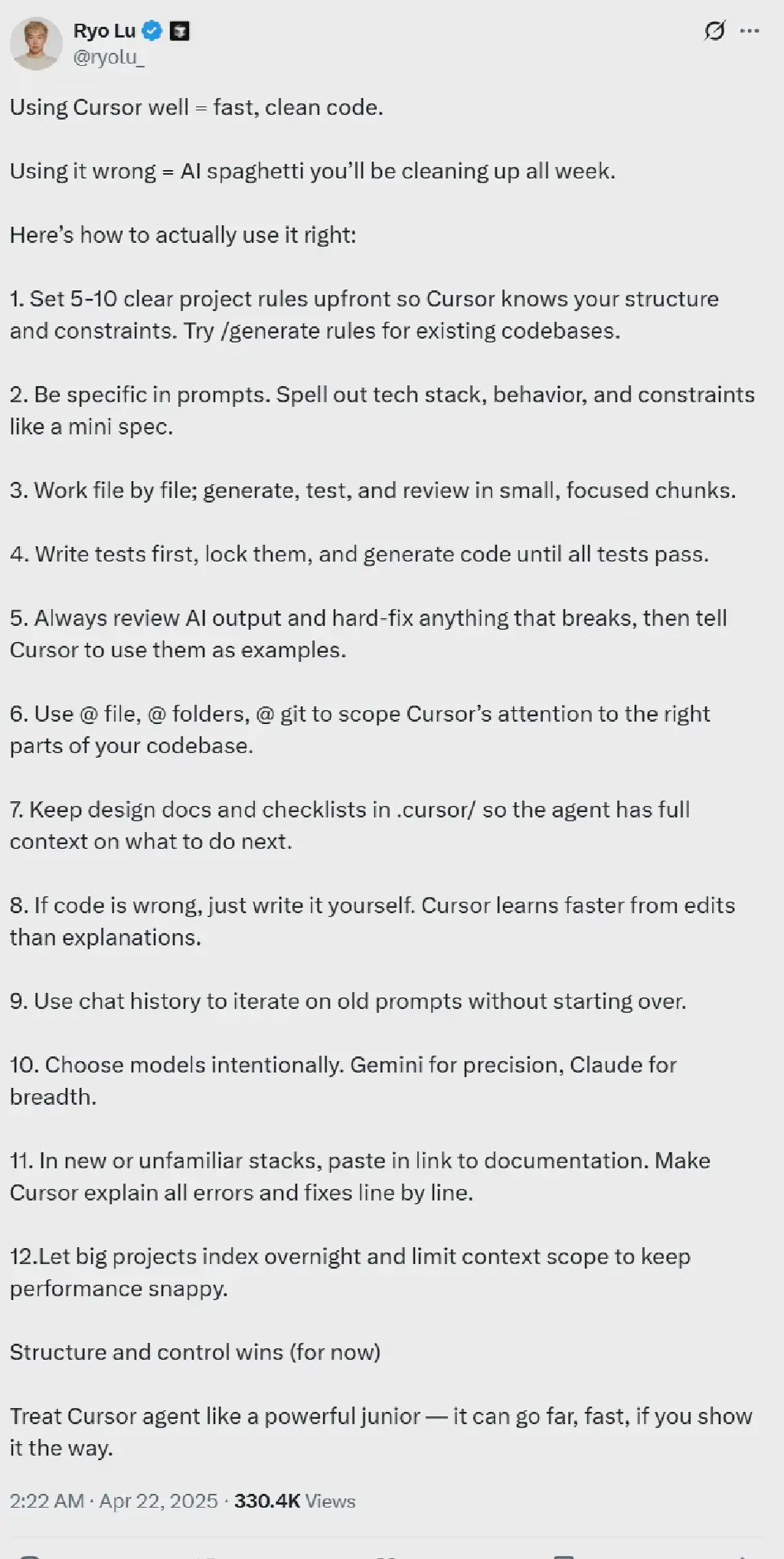
- Set clear project rules: Before starting a project, define 5-10 clear project rules so Cursor understands your code structure and constraints. For existing codebases, you can try the
/generate rulescommand to generate rules. - Be specific in prompts: Be very specific in your prompts, detailing the tech stack, expected behavior, and constraints, just like writing a mini spec.
- Work file by file: Handle a small portion each time; generate, test, and review while staying focused.
- Tests first: Write tests first, lock down the test cases, then generate code until all tests pass.
- Strict review and correction: Always review the AI’s output and manually fix any errors, then tell Cursor to use those corrections as examples.
- Limit the scope: Use commands such as
@ file,@ folders, and@ gitto restrict Cursor’s attention to specific parts of the codebase. - Provide full context: Keep design documents and checklists in the
.cursor/directory so the Cursor agent can fully understand what needs to be done next. - Fix wrong code directly: If the generated code is wrong, just modify it manually. Cursor learns faster from edits than from explanations.
- Leverage chat history: Use chat history to iterate on old prompts without starting from scratch.
- Choose models wisely: Select models purposefully according to your needs. For example, Gemini suits the pursuit of precision, while Claude suits scenarios requiring broader knowledge.
- Handle new or unfamiliar stacks: When working with a new or unfamiliar tech stack, paste in links to the relevant documentation. Have Cursor explain all errors and fixes line by line.
- Optimize performance for large projects: For large projects, let it index overnight and limit the context scope to keep performance smooth.
| |
How Can Test Developers Make Good Use of Cursor?
As a test developer or test automation engineer, how can we make good use of Cursor when writing test scripts or tools to better improve our efficiency and output? In this article, referring to the 12 rules above, we summarize a set of relevant practical guidelines.
Initialization and Context Building - Training Cursor into a “Test Domain Expert”
At the start of a project or when joining it midway, the first priority is to let Cursor fully understand the standards and constraints of the current testing environment. High-quality context input is the prerequisite for high-quality code output.
Define Project Testing Rules and Conventions (Rule 1)
In test automation projects, consistency in coding standards, framework selection, and design patterns is crucial. Based on Rule 1: Set clear project rules, we can use the .cursor/rules.md file to make this tacit team knowledge explicit and provide Cursor with a clear program of action. For existing projects, you can first use the /generate rules command to initially extract the rules, and then add to them manually.
Practical example: In a Python Flask-based web project, the testing stack is Pytest and Selenium. You can define the following rules in .cursor/rules.md:
| |
Provide Detailed Instructions to Simulate “Test Scenarios” (Rule 2)
The quality of your interaction with AI directly determines the quality of the output code. Instructions for test automation especially demand precision, because they must fully describe the feature under test, input data, expected behavior, and even exceptional paths.
Practical example: Write integration tests for the user login feature.
- Ineffective instruction:
Write a login test. - Well-structured instruction:
| |
Iterative Development and Correction - Achieving “Continuous Integration of Test Code”
Breaking down complex testing tasks and developing through an agile loop of “generate - verify - correct” is an effective strategy for ensuring code quality and project progress.
Small Steps, Incremental Verification (Rule 3)
You should resist the temptation to generate all the tests for an entire complex module in one go.
The right approach is to break the task down into the smallest verifiable units and tackle them one by one.
For example, when writing tests for a set of RESTful APIs, you should follow the logical order of “create user -> get user -> update user -> delete user”, generating and verifying the test code one at a time
This approach helps locate problems quickly and avoids the accumulation of errors.
Applying Test-Driven Development (TDD) (Rule 4)
Test-driven development is a classic model for ensuring code quality, and Cursor can be a powerful accelerator for it. Engineers first define the expected behavior of a function (that is, write the test cases), then have the AI generate implementation code that satisfies those tests.
Practical example: Implement a discount calculation function calculate_discount(price, discount_rate).
- Define the test: First ask Cursor:
Generate a Pytest test case for the calculate_discount function. When price=100 and discount_rate=0.1, the expected return value is 90; when discount_rate is negative, a ValueError exception should be raised. - Generate the implementation: After the test code
test_calculate_discount.pyis generated, run it (it will fail at this point), then give Cursor a new instruction:Based on the test cases just generated, implement the calculate_discount function. - Close the verification loop: Once Cursor generates the function implementation, run the tests again until they all pass.
Proactive Correction and Mutual Learning (Rule 5)
It is worth noting that AI-generated code is not always correct, and the engineer’s review and correction is the last line of defense. Fixing errors directly in the code is the most effective way to train Cursor, far better than explaining to it in natural language.
Practical example:
For example, in a UI test generated by Cursor, it used an unstable and incorrect XPath locator //button[@id='submit']. After the test run fails, we can directly change it manually to a correct locator, such as //input[@value='Login']. After the correction, you can leave a note in the chat to reinforce its learning: "I have fixed the locator for the login button; the new locator is more accurate. Please refer to this pattern in subsequent tasks." .
Fine-Grained Management - Achieving “Intelligent Scheduling of Test Resources”
In large projects, how to keep Cursor focused on the right information is key to determining its efficiency and relevance.
Precisely Limit the Context Scope (Rule 6)
In a large codebase, testing tasks are often related only to a specific module or service. By using the @folders or @file commands, you can significantly narrow Cursor’s analysis scope and keep it focused on the necessary context.
Practical example:
When writing API tests for the user_service microservice, all relevant code resides in the services/user_service/ directory. In this case, you should first enter @folders services/user_service/ before asking, and then describe the specific testing requirements.
Accumulate Project Knowledge to Support Decisions (Rule 7)
You can distill key information such as testing strategy, UI locator priorities, and data mocking conventions into documents stored in the .cursor/ directory. This is equivalent to providing Cursor with a “project-level knowledge base”.
Practical example:
Create a .cursor/ui_locators_priority.md file with the content: “UI element locator priority order: ID > Name > CSS Selector > XPath”. You can then reference it when asking: Please refer to the strategy in .cursor/ui_locators_priority.md and generate Selenium locator code for the 'Submit' button on the registration page..
Problem Solving and Efficiency Optimization - Becoming a “Test Efficiency Accelerator”
Mastering advanced usage can further transform Cursor from an everyday assistant into a powerful tool for solving complex problems and accelerating learning.
Choose AI Models Wisely (Rule 10)
Different AI models have different strengths. Choosing the right model based on the characteristics of the testing task can get you twice the result with half the effort.
- Gemini (precision first): suited to generating unit tests with strict syntax requirements, algorithm validation, or fine-grained test code using specific frameworks (such as React Testing Library).
- Claude (breadth first): better suited to scenarios that require understanding large amounts of context, such as generating comprehensive integration tests from API documentation, designing end-to-end (E2E) test scenarios, or exploring and suggesting test points in an unfamiliar codebase.
Use Documentation to Quickly Master New Technologies (Rule 11)
When a team introduces a new testing framework (such as Playwright), engineers can use Cursor to quickly get over the learning curve.
Practical example: Provide Cursor directly with a link to the official Playwright documentation and ask it to generate example code. When the generated code throws an error at runtime, you can paste the error message and ask: “This is an error that occurred while running a Playwright script; please explain the cause of the error line by line based on the official documentation and provide suggestions for fixing it.”.
Limit the Context Scope (Rule 12)
When the project codebase is large, index it overnight and limit the context scope.
Practical example:
When working on a large testing project, allow Cursor to handle indexing in the background and do the actual code generation the next day, so as to keep performance smooth.
| |
Conclusion
For our actual work, the essence of successfully using Cursor is a process of shifting from an “instruction giver” to an “intelligent collaborator” and a “knowledge guide”. The emphasis is on highlighting its systematic role in intelligent collaboration, knowledge accumulation, and efficiency improvement.