1
 2
 3
 4
 5
 6
 7
 8
 9
10
11
12
13
14
15
16
17
18
19
20
21
22
23
24
25
26
27
28
29
30
31
32
33
34
35
36
37
38
39
40
41
42
43
44
45
46
47
48
49
50
51
52
53
54
55
56
57
58
59
60
61
62
63
64
65
66
67
68
69
70
71
72
73
74
75
76
77
78
79
80
81
82
83
84
85
86
87
88
89
90
91
92
93
94
95
96
97
98
99
100
101
102
103
104
105
106
107
108
109
110
111
112
113
114
115
116
117
118
119
120
121
122
123
124
125
126
127
128
129
130
131
132
133
134
135
136
137
138
139
140
141
142
143
144
145
146
147
148
149
150
151
152
153
154
155
156
157
158
159
160
161
162
163
164
165
166
167
168
169
170
171
172
173
174
175
176
177
178
179
180
181
182
183
184
185
186
187
188
189
190
191
192
193
194
195
196
197
198
199
200
201
202
203
204
205
206
207
208
209
210
211
212
213
214
215
216
217
218
219
220
221
222
223
224
225
226
227
228
229
230
231
232
233
234
235
236
237
238
239
240
241
242
243
244
245
246
247
248
249
250
251
252
253
254
255
256
257
258
259
260
261
262
263
264
265
266
267
268
269
270
271
272
273
274
275
276
277
278
279
280
281
282
283
284
285
286
287
288
289
290
291
292
293
294
295
296
297
298
299
300
301
302
303
304
305
306
307
308
309
310
311
312
313
314
315
316
317
318
319
320
321
322
323
324
325
326
327
328
329
330
331
332
333
334
335
336
337
338
339
340
341
342
343
344
345
346
347
348
349
350
351
352
353
354
355
356
357
358
359
360
361
362
363
364
365
366
367
368
369
370
371
372
373
374
375
376
377
378
379
380
381
382
383
384
385
386
387
|
CodeBuddy

Many thanks for the user's further clarification. Now I have the complete requirement information:

1. Platform: WeChat Mini Program

2. Tech preference: Vue-style WeChat Mini Program development

3. Visual style: modern minimalist style

4. GitHub API access method: use a cloud function as the middle layer

5. Trending repository definition: most new stars added today

6. Refresh mechanism: refresh when the App starts

Based on this information, I can work out a detailed implementation plan, including the project structure, main functional modules, UI design ideas, and development steps.

# GitHub Trending Repositories WeChat Mini Program Development Plan

**Project Overview**

Develop a WeChat Mini Program that displays the 5 GitHub repositories with the most new stars added today, using a modern minimalist UI design and calling the GitHub API through cloud functions.

**Tech Stack**

- Frontend: native WeChat Mini Program development (WXML, WXSS, JS)
- Backend: WeChat Cloud Development (cloud functions)
- API: GitHub REST API

**Project Structure**

`├── miniprogram/          # Mini program frontend code │   ├── pages/            # Page files │   │   ├── index/        # Main page │   │   └── detail/       # Detail page (optional) │   ├── components/       # Custom components │   │   └── repo-card/    # Repository card component │   ├── images/           # Icons and image assets │   ├── styles/           # Common styles │   └── utils/            # Utility functions └── cloudfunctions/       # Cloud functions     └── getHotRepos/      # Cloud function for fetching trending repositories`

**Functional Modules**

**1. Cloud Function Module**

- Create the `getHotRepos` cloud function, responsible for:
- Call the GitHub API to fetch the repositories with the most new stars added today
- Data processing and filtering, returning detailed information for the top 5 repositories
- Handle API request limits and error conditions

**2. Frontend Display Module**

- Main page (index):
- Top title bar showing the application name and refresh status
- Repository list area, using a card-based layout to show the 5 trending repositories
- Loading state and error prompts
- Repository card component (repo-card):
- Repository name and description
- Author information and avatar
- Star count (total and today's new additions)
- Programming language (with a color indicator)
- Jump button (can open a web-view or copy the link)

**3. Data Interaction Module**

- Automatically call the cloud function to fetch data when the app starts
- Implement a pull-to-refresh feature (optional)
- Data caching mechanism to reduce unnecessary API calls

**UI Design Ideas**

- Color scheme:
- Primary color: GitHub dark blue (#0366d6)
- Background color: light gray or white (#f6f8fa)
- Accent color: GitHub green (#2ea44f)
- Card design:
- Rounded rectangle cards
- Appropriate shadow effects
- Clear information hierarchy
- Motion effects:
- Loading animation
- Card click feedback
- Smooth list scrolling

**Development Steps**

1. **Project Initialization**

- Create a WeChat Mini Program project
- Configure the cloud development environment

2. **Cloud Function Development**

- Write the cloud function that fetches trending GitHub repositories
- Test API calls and data processing

3. **Frontend Page Development**

- Design and implement the main page layout
- Develop the repository card component
- Implement the data loading and display logic

4. **Style Optimization**

- Apply the modern minimalist style
- Optimize the visuals and interaction experience

5. **Functional Testing and Optimization**

- Test data loading and display
- Optimize performance and user experience

6. **Release and Deployment**

- Configure the Mini Program's basic information
- Submit for review and publish

**Notes**

- The GitHub API has request rate limits, so a sensible caching strategy needs to be designed
- WeChat Mini Programs have limits on network requests and page size, so attention must be paid to performance optimization
- Ensure the UI displays well on devices of different sizes

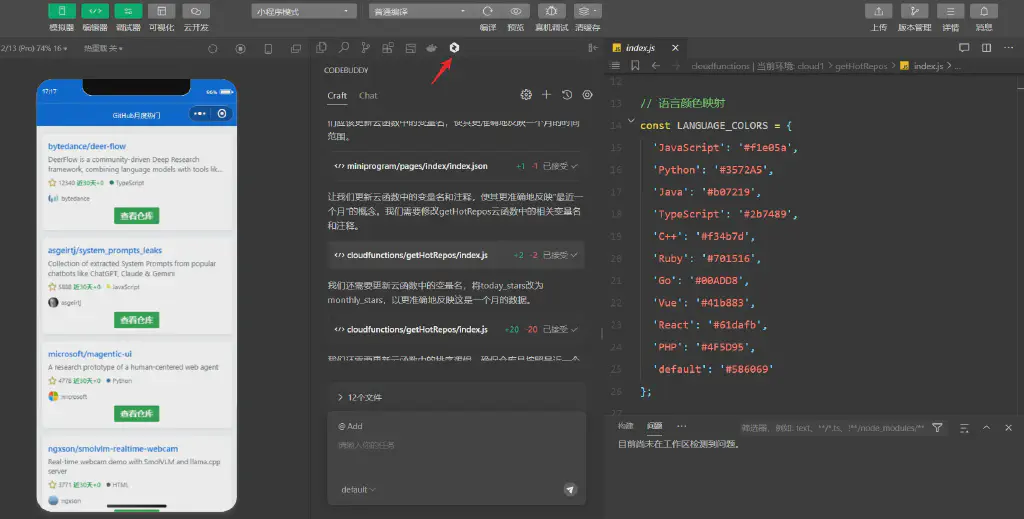
According to the development plan provided by the user, I need to develop a WeChat Mini Program that displays the 5 GitHub repositories with the most new stars added today. This project requires native WeChat Mini Program development and cloud development.

First, I need to create the basic project structure, including:

1. Create the Mini Program frontend code structure

2. Create the cloud function

3. Implement the main functional modules

Let me first check whether the current directory is empty, and then start creating the project structure.

0 files in the root directory

Completed

The directory is empty, so we need to create the project structure from scratch. First, create the basic project directory structure, including the Mini Program frontend code and the cloud functions directory.

Let's first create the following key files:

1. project.config.json - Mini Program project configuration file

2. app.json - Mini Program global configuration file

3. app.js - Mini Program entry file

4. app.wxss - Mini Program global style file

Let's first create the project configuration file.

project.config.json

+78 -0

Accepted

Now that we have created the project configuration file, next we need to create the basic Mini Program structure. First create the miniprogram directory, then create the app.js, app.json, and app.wxss files inside it.

1. Create the miniprogram directory

2. Create app.js - Mini Program entry file

3. Create app.json - Mini Program global configuration file

4. Create app.wxss - Mini Program global style file

Let's first create the miniprogram directory, and then create these basic files.

mkdir -p miniprogram

The directory was created successfully; now let's create the basic Mini Program files. First create app.json, configuring the Mini Program's global settings, including page paths, window styles, and so on.

miniprogram/app.json

+16 -0

Accepted

Now create the app.js file, which is the Mini Program's entry file used to initialize the Mini Program. We will initialize the cloud development environment here.

miniprogram/app.js

+22 -0

Accepted

Next create the app.wxss file, which defines global styles. We will use GitHub's color scheme and define some common styles.

miniprogram/app.wxss

+80 -0

Accepted

Now we need to create the files for the main page (index). We need to create the following files under the miniprogram/pages/index/ directory:

1. index.js - Page logic

2. index.wxml - Page structure

3. index.wxss - Page styles

4. index.json - Page configuration

First create the index directory, then create these files.

mkdir -p miniprogram/pages/index

The directory was created successfully; now let's create the files for the index page. First create index.wxml, designing the basic page structure, including the loading state, the repository list, and so on.

miniprogram/pages/index/index.wxml

+58 -2

Accepted

Now create the index.wxss file to add styles to the main page. We will use a modern minimalist design style, including a card-based layout, appropriate shadow effects, and so on.

miniprogram/pages/index/index.wxss

+144 -0

Accepted

Next create the index.js file, implementing the page's business logic, including:

1. Fetching trending repository data when the page loads

2. Handling refresh operations

3. Implementing features such as copying links and opening repositories

miniprogram/pages/index/index.js

+78 -40

Accepted

Now create the index.json file, configuring the page's basic settings, including enabling features such as pull-to-refresh. Then we need to create the getHotRepos cloud function to fetch trending GitHub repository data.

miniprogram/pages/index/index.json

+7 -0

Accepted

Now we need to create some necessary image assets. We need to create an images folder under the miniprogram directory and prepare some basic icons, such as a loading icon and a star icon.

First create the images directory:

mkdir -p miniprogram/images

Now we need to create the getHotRepos cloud function. First create the cloudfunctions directory and the getHotRepos cloud function directory, then create the cloud function's related files.

1. Create the cloudfunctions/getHotRepos directory

2. Create the package.json and index.js files

mkdir -p cloudfunctions/getHotRepos

Now create the cloud function's package.json file, adding the necessary dependencies, including axios for making HTTP requests.

cloudfunctions/getHotRepos/package.json

+17 -0

Accepted

Now create the cloud function's main file, index.js, implementing the logic for fetching trending GitHub repositories. We will:

1. Use the GitHub API to search repositories

2. Sort by the number of new stars added today

3. Fetch detailed information for the top 5 repositories

4. Handle error conditions and API limits

cloudfunctions/getHotRepos/index.js

+144 -0

Accepted

Now we need to create some basic icon files. Since we cannot directly create binary image files, we can create a sitemap.json file, which is a required file for WeChat Mini Programs, used to configure the Mini Program's indexing rules.

Then, we can create a README.md file that provides the project's description and usage guide.

miniprogram/sitemap.json

+8 -0

Accepted

Now let's create a README.md file that provides a detailed project description, installation steps, and a usage guide. This will help other developers understand and use this project.

README.md

+88 -0

Accepted

Now we have completed the development of the project's basic structure and core features. Let's summarize the work completed and the next steps that require the user's action:

1. Work completed:

- Created the complete project structure
- Implemented the main page's UI and logic
- Implemented the cloud function for fetching trending GitHub repositories
- Created the project documentation

2. Actions the user needs to take:

- Configure WeChat Developer Tools and the AppID
- Enable the cloud development environment
- Configure the GitHub Token
- Upload and deploy the cloud function
- Add the necessary icon files to the images directory

Let me use the attempt_completion tool to summarize the project's completion status and next steps.

# GitHub Trending Repositories Mini Program Development Complete

**Development Work Completed**

1. **Project Structure Setup**

- Created the complete WeChat Mini Program project structure
- Configured the necessary project files (project.config.json, app.json, etc.)
- Created the cloud functions directory structure

2. **Frontend Development**

- Implemented the full functionality of the main page (index)
- Designed a modern minimalist UI interface
- Implemented interactive features such as pull-to-refresh

3. **Backend Development**

- Implemented the getHotRepos cloud function
- Integrated GitHub API calls
- Implemented data processing and error handling

4. **Documentation**

- Created a detailed README.md file
- Provided complete installation and usage instructions

**Next Steps**

To run this project, you need to:

1. **Environment Configuration**

- Open the project with WeChat Developer Tools
- Configure your AppID in project.config.json
- Enable cloud development and create a cloud environment
- Configure the cloud environment ID in app.js

2. **Resource Preparation**

- Add the necessary icons under the miniprogram/images/ directory:
- loading.gif (loading animation)
- star.png (star icon)

3. **Cloud Function Deployment**

- Enter the cloudfunctions/getHotRepos directory
- Install dependencies: npm install
- Configure the GitHub Token in the cloud development console (optional)
- Upload and deploy the cloud function

4. **Running Tests**

- Compile and run the project
- Test the data loading feature
- Test the pull-to-refresh feature
- Test the repository link copying feature

**Notes**

1. Make sure all necessary environment variables and configuration items are correctly configured

2. It is recommended to configure a GitHub Token to avoid API limits

3. On the first run, wait for the cloud function deployment to complete

4. If you run into problems, see the detailed instructions in README.md

The project source code is ready; you can start using and testing it by following the steps above. If you have any questions, feel free to refer to the README.md file or ask.
|