Preface
In software product development, a Bug is both the most important output of testing work, the direct input for developers to fix problems, and the main lever for improving product quality.
In the previous article, we analyzed, from the tester’s perspective, how to help the team carry out quality improvement more efficiently when submitting Bugs.
But beyond the Bug submission stage, in our work a Bug goes through a complete lifecycle from discovery to being fixed, and the issue tickets we submit present different states accordingly. The transitions of a Bug among these different states in fact reflect the team’s collaborative communication process around the Bug. In real work, disagreements arising from Bug determination or state setting are common; especially in teams that treat Bugs as important KPI data, heated arguments between testing and development over Bugs happen from time to time. For example:
- Development and testing disagree on Bug determination; testing thinks it is a Bug, development thinks it is not a problem—how should this be handled?
- There is a disagreement over Bug ownership; is it a front-end problem or a back-end problem?
- A Bug cannot be reproduced; should it be closed?
- …and so on
In this article, we will sort out in detail the complete lifecycle of a Bug, as well as the principles for handling its states at different stages.
The Bug Lifecycle and Its Different States
A Bug does not appear out of nowhere; it is a quality problem exposed during the testing process. From being discovered to having the fix completed and confirmed correct, it goes through a process, and this process is the Bug lifecycle. In software development, the management of this lifecycle is usually handled by a Bug management system (common ones include Jira, ZenTao, Bugfree, HP QC, etc.) to track and synchronize the state of each Bug, and to serve as a collaboration bridge between developers and testers.
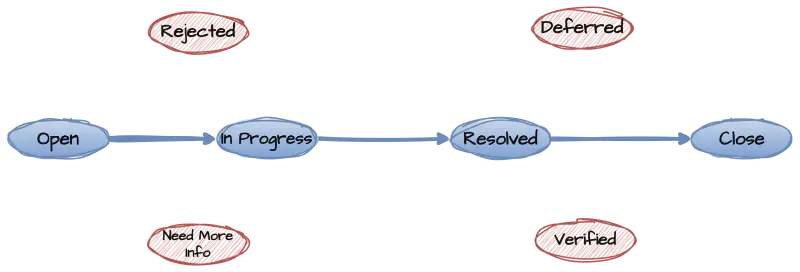
The main process of the Bug lifecycle is roughly as follows:

Open
The Open state is the initial state after a Bug is discovered. Usually the tester who found the Bug enters it into the Bug management system to create an issue ticket; at this point the Bug’s state is Open, which also means the Bug is pending handling.
In addition, if there is a historically closed Bug that is later found not to have actually been resolved, the Bug can be reactivated, and at this point the Bug will also be in the Open state.
In this state, the tester who submitted the Bug should designate a developer to handle the Bug for the next step, usually assigning it directly, based on the Bug’s symptoms, to the developer who can fix the Bug. However, Bug management systems generally also set a default handler; for Bugs in the Open state, the default handler is usually set to the development lead, who will make a more accurate judgment for reassignment.
| Status | Description | Current Owner | Hand-off Owner |
|---|---|---|---|
| Open | Initial state, pending handling | Test Engineer | Development lead or Bug owner |
In Progress
After a developer is assigned a Bug, it enters the Bug analysis stage. At this point it is uncertain whether the Bug can be fixed, so it enters the In Progress state; after analysis, the developer can either fix the Bug, or find that it is not a problem they can fix and reassign the Bug to the developer who should actually fix it.
If there is a hand-off of the Bug among developers here, the Bug state remains In Progress, and only the current handler changes.
| Status | Description | Current Owner | Hand-off Owner |
|---|---|---|---|
| In Progress | Bug enters analysis, usually for relatively complex Bugs | Assigned Developer | Actual Bug fixer |
Resolved
After a Bug has been fixed by a developer, it is marked as Resolved. This state actually means the tester can verify the Bug.
It is worth noting here that many developers have a misconception: that having modified the code or done self-testing means it is Resolved. Actually it is not; the key point of the Resolved state is the handler it is handed off to, that is, the tester is able to perform verification.
Because in real work, when testers test a product, there is the concept of testing rounds, and testing cannot be done at any arbitrary time. So only when the fixed code has entered the next round of test submission should the state be set to Resolved. Otherwise, in the current test environment, the fixed code has not yet been deployed, and of course verification cannot actually be completed.
(A more complete Bug management system would add a Pending Verification state; in that case Resolved would only mean the developer has finished the code fix, and Pending Verification would be the re-submission for testing. This article focuses on the commonly necessary states and will not expand further)
| Status | Description | Current Owner | Hand-off Owner |
|---|---|---|---|
| Resolved | Bug fix completed, marked as resolved, i.e. pending verification | Bug fixer | Test Engineer |
Closed
After verification confirms that the Bug has been fixed, the Bug can be set to the Closed state. This state means the quality problem reflected by the Bug no longer exists in the current product version.
Closing a Bug should be a very serious matter; usually it should only be closed after confirmation by the Bug’s submitter. Of course, in special cases, the product’s decision-making team (CCB) may also decide whether a Bug can be closed.
In addition, situations where a closed Bug needs to be reactivated also occur from time to time—for example, when verification scenarios were not considered thoroughly enough, when environmental problems caused an erroneous close, or when, after a test-build version switch, an already-fixed Bug was broken again, or wrong code was merged back in, and so on; in these cases the Bug reopening (ReOpen) operation is involved.
| Status | Description | Current Owner | Hand-off Owner |
|---|---|---|---|
| Closed | Bug confirmed fixed; the quality problem corresponding to the Bug no longer exists in the version | Bug submitter | None |
Besides the most important Bug lifecycle states above, in real work there are also some special cases, which likewise correspond to different Bug states
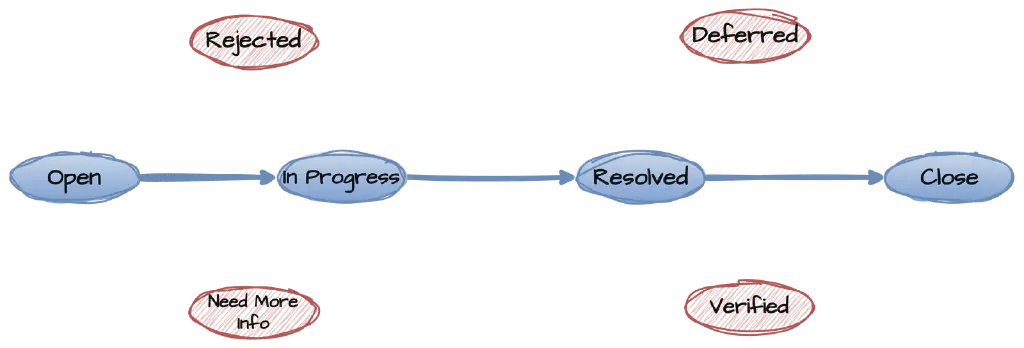
Rejected
During testing, when testers make a misjudgment or the environment is configured incorrectly, it is fairly common for a submitted Bug to turn out not to be a quality problem. After analysis, if the developer considers it not a bug, the Bug can be set to the Rejected state. At this point the Bug returns to the tester for confirmation; if the false positive is accepted, the submitter can perform the close operation.
| Status | Description | Current Owner | Hand-off Owner |
|---|---|---|---|
| Rejected | After analysis the Bug is a false positive and does not reflect a quality problem | Bug analyst | Bug submitter |
But in practice, for rejected Bugs, many times the cause is a disagreement between testing and development over the requirements or over whether it is a quality problem. When the disagreement cannot be reconciled on its own, the normal operation should be: The tester resubmits the Bug, but the Bug should not be assigned to developers; instead it should be assigned to the product decision-making team CCB (mainly the BA or PO), which arbitrates and, based on the arbitration result, determines whether a fix or a close is needed.
Verified
After a tester verifies a Bug and finds no problem, they can usually perform the close operation to set the state to Closed, but a more complete lifecycle actually also has a Verified state. The use of this state usually occurs when the tester who verifies the Bug and the submitter who filed the Bug are not the same person; after the verifier performs verification on the Bug, they cannot represent the submitter in confirming that the Bug can be closed.
Another case is the more rigorous large-scale software development process, where the testing phase may also include multiple stages. After a subsystem-level test team completes testing, there may still be system-level system testing or full acceptance at the larger-system level, and only after the subsystem-level testing moves into subsequent testing will the state be set to Closed
| Status | Description | Current Owner | Hand-off Owner |
|---|---|---|---|
| Verified | Bug has been verified as fixed | Bug verifier | Bug submitter |
Need More Info
This state is for situations where the Bug information submitted by the tester is incomplete or insufficient to complete the analysis of the Bug, and the developer has difficulty understanding the specific Bug symptoms. In this case the handler sets the issue ticket to the Need More Info state and returns it to the Bug submitter to supplement the relevant information.
| Status | Description | Current Owner | Hand-off Owner |
|---|---|---|---|
| Need More Info | Bug ticket information is insufficient; more detailed information needs to be added | Bug analyst | Bug submitter |
Deferred
Deferral generally targets the following situations:
- The Bug is hard to reproduce, and it is difficult to analyze the cause
- The Bug is difficult to modify, requiring substantial changes to the product, and a workaround exists
- The Bug has low priority, does not affect main functions, and there are other more important problems to solve before the version release
For the above situations, after a decision by the product CCB team, the Bug can be deferred. At the same time, the Bug’s analysis owner still needs to continue analyzing the Bug or fix it later.
But it should be noted here that the Deferred state does not mean the Bug is not a problem; in the test team’s quality analysis, Bugs in this state should still be treated as valid Bugs. That is, such Bugs will still affect the final quality assessment conclusion of the version.
| Status | Description | Current Owner | Hand-off Owner |
|---|---|---|---|
| Deferred | Bug cannot be resolved in the current version for specific reasons; after approval by the project CCB team decision, the Bug can be kept in the version for later resolution | CCB decision team | Bug analyst |
The above is our introduction to the main state definitions that appear in the Bug lifecycle and the related handling principles. Besides the Bug states listed above, a more complete Bug lifecycle also includes:
- Pending Verification: Fixed, waiting for the version to be submitted for testing
- Under Investigation: For relatively complex Bugs involving considerable research work such as technology selection and solution comparison, this state can be defined before handling the Bug
- Investigated: For Bugs on which solution research has been done as above, when the fix plan has not yet been determined, the Bug is in this state
- Verifying: For Bugs with relatively complex test scenarios that require a long verification, such as performance-related issues, the Bug can be placed in this state before verification is complete
Of course, processes are rigid; what matters most for good, efficient team collaboration is still mutual trust and mutual support among the different roles in the team.
Nevertheless, understanding the different stages in the correct process and the principles of correct handling also helps us reduce the internal friction of mutual arguing and wrangling when problems or disagreements arise.
Bug Status Transitions
Based on the analysis of the different states above, a fairly complete Bug status transition diagram is shown below for reference.
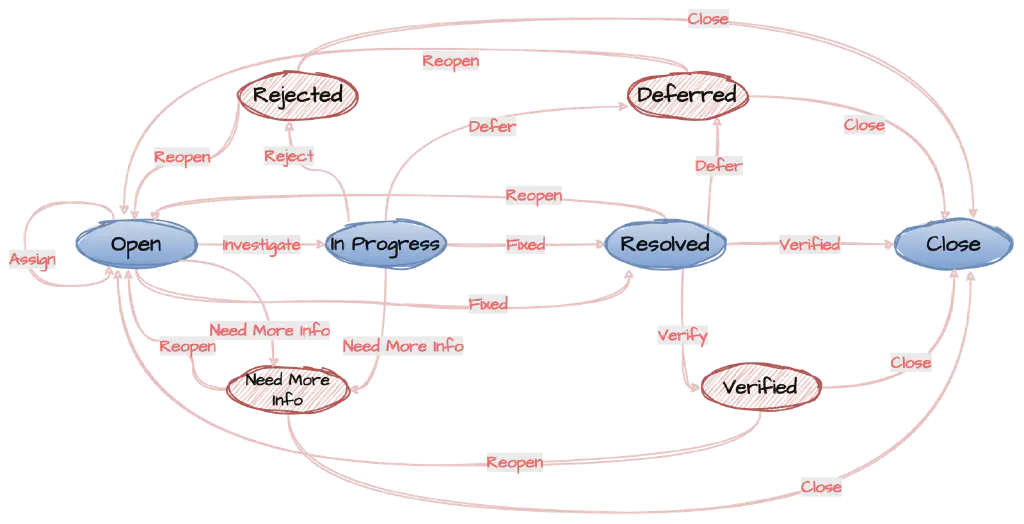
If you need the complete full-size diagram above, reply with Bug Status to get it.
Also reply with Outline to view the detailed syllabus of the Qiucao Full-Stack Testing Skills Improvement Course. Reply with Join the Group to enter the testing exchange group and share testing techniques and exchange information with fellow testers.