In a previous article
Automatically Generating Test Scripts with DeepSeek + VS Code
we introduced an AI plugin for VS Code that helps us automatically generate test cases.
Now the official DeepSeek API has reopened as well, offering more possibilities for deeply leveraging large models such as DeepSeek to build applications that fit real-world work.
Below, taking the integration of DeepSeek’s official API as an example, we will walk through a practice of calling a large model from code to automatically generate test cases and execute them.
First, head to the API open platform from the official DeepSeek website

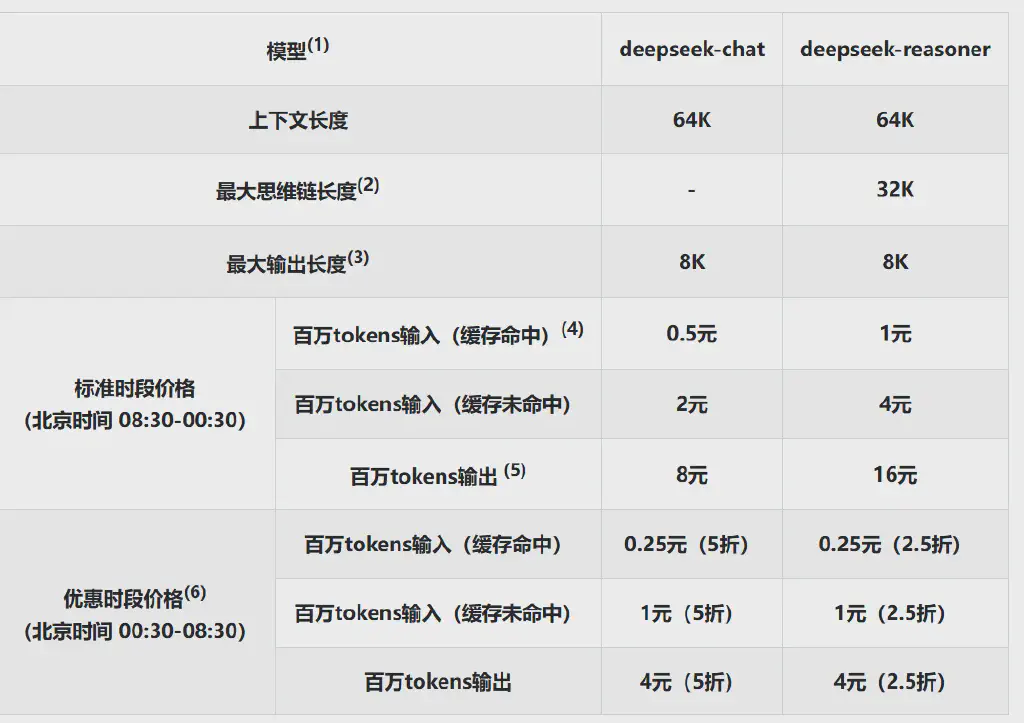
Once there, apply for an API key. DeepSeek’s pricing is still fairly low at the moment, and there are sizable discounts during certain hours.
With this API key, we can start calling it from our code.
The DeepSeek API is currently compatible with the OpenAI API interface.
With the code below, combined with Python’s standard library inspect, we can have DeepSeek generate test cases directly against our code under test.
Of course, we can also feed the corresponding requirements text to DeepSeek; the principle is similar.
 1
 2
 3
 4
 5
 6
 7
 8
 9
10
11
12
13
14
15
16
17
18
19
20
21
22
23
24
25
26
27
28
29
30
31
32
33
34
35
36
37
38
39
40
41
42
43
44
| import inspect
from openai import OpenAI
# Import the DeepSeek API
client = OpenAI(api_key="<your_deepseek_api_key>", base_url="https://api.deepseek.com")
# Function under test, calculates BMI
def calculate_bmi(weight, height):
if height <= 0 or weight <= 0:
raise ValueError("身高、体重必须大于0")
bmi = weight / (height ** 2)
if bmi < 18.5:
return "竹竿!"
elif 18.5 <= bmi < 24.9:
return "正常人"
elif 25 <= bmi < 29.9:
return "壮士!"
else:
return "肥宅!"
# Get the function's source code via inspect
function_code = inspect.getsource(calculate_bmi)
# Define the prompt based on the retrieved code
the_prompt = f"""
请针对以下代码生成基于pytest框架的测试用例:{function_code}
尽可能使用参数化测试,包含各种异常场景
"""
# Call the DeepSeek API using the V3 model and get the response
response = client.chat.completions.create(
model="deepseek-chat",
messages=[
{"role": "system", "content": "You are a python testing assistant"},
{"role": "user", "content": the_prompt},
],
max_tokens=1024,
temperature=0.7
stream=False
)
print(response.choices[0].message.content)
|
With the code above, we can obtain the result returned by DeepSeek V3:
 1
 2
 3
 4
 5
 6
 7
 8
 9
10
11
12
13
14
15
16
17
18
19
20
21
22
23
24
25
26
27
28
29
30
31
32
33
34
35
36
37
38
39
40
41
42
43
44
45
46
47
48
49
50
|
To test the `calculate_bmi` function, we can use the `pytest` framework together with `pytest.mark.parametrize` to implement parameterized testing. Below is a complete test case covering both normal and exceptional scenarios.

 ```python
import pytest

# Import the function under test
from your_module import calculate_bmi

# Test cases for normal scenarios
@pytest.mark.parametrize("weight, height, expected", [
    (60, 1.75, "正常人"),  # Normal BMI
    (50, 1.75, "竹竿!"),  # Low BMI
    (80, 1.75, "壮士!"),  # High BMI
    (100, 1.75, "肥宅!"),  # Very high BMI
])
def test_calculate_bmi_normal(weight, height, expected):
    assert calculate_bmi(weight, height) == expected

# Test cases for exceptional scenarios
@pytest.mark.parametrize("weight, height, expected_exception", [
    (0, 1.75, ValueError),  # Weight is 0
    (60, 0, ValueError),    # Height is 0
    (-10, 1.75, ValueError), # Weight is negative
    (60, -1.75, ValueError), # Height is negative
])
def test_calculate_bmi_exceptions(weight, height, expected_exception):
    with pytest.raises(expected_exception):
        calculate_bmi(weight, height)
` ``

### Explanation:
1. **Normal scenario tests**:
   - Use `pytest.mark.parametrize` to test different combinations of weight and height, verifying that the BMI category returned by the function is correct.
   - The test cases cover normal BMI, low BMI, high BMI, and very high BMI.

2. **Exceptional scenario tests**:
   - Verify that the function raises a `ValueError` when given invalid inputs (such as weight or height being 0 or negative).
   - Use `pytest.raises` to catch the expected exception.

### Running the tests:
Make sure you have `pytest` installed, then run the following command in the terminal to execute the tests:

```bash
pytest test_bmi.py
` ``

### Notes:
- `your_module` is the name of the module containing the `calculate_bmi` function; replace it with the actual one.
- Test files are usually named `test_*.py` or `*_test.py` so that `pytest` can discover and run them automatically.
|
To make more direct use of the generated result, we can extract the code from the markdown-formatted output here, write it into a test file, and then simply invoke and execute it.
The specific code is below; it uses a regular expression (for a detailed introduction to regular expressions, see the earlier article Mastering Regular Expressions - Leaving the Newbie Village Behind!) to extract the code portion.
 1
 2
 3
 4
 5
 6
 7
 8
 9
10
11
12
13
14
15
16
17
18
19
20
21
22
23
24
25
26
27
| # User configuration
run_tests = True # Whether to run the tests
# If tests should be run, write the test cases to a file and execute them
if run_tests:
# Create the test file
test_file_name = "test_calculate_bmi.py"
with open(test_file_name, "w",encoding="utf-8") as test_file:
test_file.write(f"import pytest\n\n")
test_file.write(f"from ai_test import calculate_bmi\n\n")
pattern = r'```python([\s\S]*?)```\n'
test_code = re.findall(pattern, test_cases, re.DOTALL)
test_file.write(test_code[0])
# Run the tests with pytest
result = subprocess.run(["pytest", test_file_name], capture_output=True, text=True)
# Print the test results
print("测试结果:")
print(result.stdout)
print("错误信息:")
print(result.stderr)
# Optional - delete the test file
# os.remove(test_file_name)
|
In this way, we have completed an experiment in which DeepSeek automatically generates test cases, executes them immediately, and outputs the results.
Of course, this example is fairly simple and only a preliminary experiment in fully automated unit testing with AI; practical applications still require deeper exploration!