Preface
In the previous article in this series 【】, we introduced the usage of the grep command, one of the Linux Text Processing Trio. But in reality, among the trio, grep is really just the little brother: enhanced by regular expressions, its role is mostly to perform pattern queries against text.
The truly heavyweight commands in the trio are sed and awk. sed is actually short for stream editor, so the sed command can genuinely function as a text editor. In this article, we’ll introduce this editor disguised as a Linux command: sed
Overview of the sed Command
The syntax of the sed command is as follows:
1
| sed -options 'operations' file-or-piped-input
|
sed is a line editor; the operation commands here process text line by line
Command Options
Its main command options are as follows:
| Command Option | Meaning |
|---|
| -n | Suppress default output |
| -r | Enable extended regular expressions |
| -i | Edit the source file in place |
| -e | Specify an operation command (enabled by default; multiple allowed) |
| -f | Read operation commands from a file |
Default Output
1
2
| sed '/root/p' /etc/passwd
# It actually displays all lines in the passwd file, with the line containing the root user shown twice
|
1
2
| sed -n '/root/p' /etc/passwd
# Adding the -n option suppresses sed's own default output, so only the matching lines are shown via the p command
|
Modifying the Original File
In real-world work, the -i option is a fairly dangerous one, because it modifies the original file directly
1
2
3
| sed -i '/root/q' /etc/passwd
# This operation leaves the passwd file containing only the root user line, because the q command exits immediately after a match
# And sed's output is then written directly back to the original file
|
A safer approach is to specify a backup file when using the -i option, that is, to append a backup file suffix right after -i
1
2
| sed -i.bak '/root/q' /etc/passwd
# Although this still modifies the passwd file, it creates a .bak backup before the change for easy recovery
|
Multiple Commands
The sed command can take multiple operation commands. When there are several, you need to specify an -e option for each one; if you use only a single command, the -e can be omitted
1
2
| sed -e '=' -e '/root/q' /etc/passwd
# The = command prints the line number of the current line being processed
|
If you want to avoid repeating -e, you can also combine commands with ;
1
2
| sed '=;/root/q' /etc/passwd
# Same effect as specifying multiple -e options
|
Operation Command Reference
In the option introduction above, we’ve actually already used commands such as p and q.
An operation command actually consists of two parts: the address part and the operation part:
- Address:
sed is a line-processing command, so addressing simply means specifying the lines to process - Operation: the action to perform on the lines that match the addressing rule
Addressing Rules
| Addressing Format | Meaning |
|---|
| Number | Match a specified line number |
| m~n | Start at line m and match with step n |
| $ | Match the last line |
| /regex/ | Match by regular expression |
| m,n | From line m to line n |
| m,+n | From line m, then match n more lines |
 1
 2
 3
 4
 5
 6
 7
 8
 9
10
11
12
13
14
15
16
17
| sed -n '5p' /etc/passwd
# Display the content of line 5
sed -n '2~3p' /etc/passwd
# Display lines starting from line 2 with a step of 3, i.e. lines 2, 5, 8, 11, 14, ...
sed -n '$p' /etc/passwd
# Display the last line
sed -n '/qiucao/p' /etc/passwd
# Display lines containing qiucao
sed -n '5,8p' /etc/passwd
# Display the content from line 5 to line 8
sed -n '5,+5p' /etc/passwd
# Display the content of lines 5, 6, 7, 8, 9, 10
|
Operation Commands
| Operation Command | Meaning |
|---|
| p | Print matching lines |
| = | Output the line number of matching lines |
| l | Print matching lines and show invisible characters |
| s | Regular expression match and replace |
| c | Replace the entire matching line |
| a | Append content after the matching line |
| i | Insert content before the matching line |
| d | Delete matching lines |
| r | Append content after the matching line (from a file) |
| w | Write matching line content to a file |
| q | Exit after a match, no further matching |
 1
 2
 3
 4
 5
 6
 7
 8
 9
10
11
12
13
14
15
16
17
18
19
20
21
22
23
24
25
26
| sed -n '=;5p' /etc/passwd
# Print all line numbers and display the content of line 5
sed -n '=;5l' /etc/passwd
# Similar to the previous command, but the end-of-line marker ($) is also printed
sed -r '=;s/^m\w*/test/g' /etc/passwd
# Replace all usernames starting with m with test; /g replaces all matches within a line, otherwise only the first is replaced
sed '=;5c\测试一下' /etc/passwd
# Replace line 5 with "测试一下"
sed '=;5a\测试一下' /etc/passwd
# Append a line after line 5
sed '=;5i\测试一下' /etc/passwd
# Insert a line before line 5
sed '=;5d' /etc/passwd
# Delete line 5
sed '=;5r test.txt' /etc/passwd
# Read a line from test.txt and append it after line 5
sed '=;5w test.txt' /etc/passwd
# Write the content of line 5 to test.txt
|
Pattern Space and Hold Space
The operation commands introduced above are mainly for within-line operations. Since we say sed is actually an editor, it certainly also supports multi-line text editing operations, such as copying, pasting, and cutting whole lines.
This brings us to the two memory spaces that sed reserves during processing:
- Pattern space: stores the content of the line currently being processed; after each line is handled, the processed content is placed in this space
- Hold space: used to temporarily store data; it can be thought of as a clipboard-like cache for exchanging content between lines. Initially it contains only a single
\n newline character by default
| Operation Command | Usage |
|---|
| h | Copy the pattern space content to the hold space, replacing the original content (\n) |
| H | Append the pattern space content to the hold space |
| g | Copy the hold space content to the pattern space, overwriting the original content |
| G | Append the hold space content after the current pattern space content |
| x | Swap the pattern space and hold space content |
| n | Immediately read the next line and copy it to the pattern space |
| N | Immediately read the next line and append it to the current pattern space (often used to join lines) |
Example
1
2
3
4
5
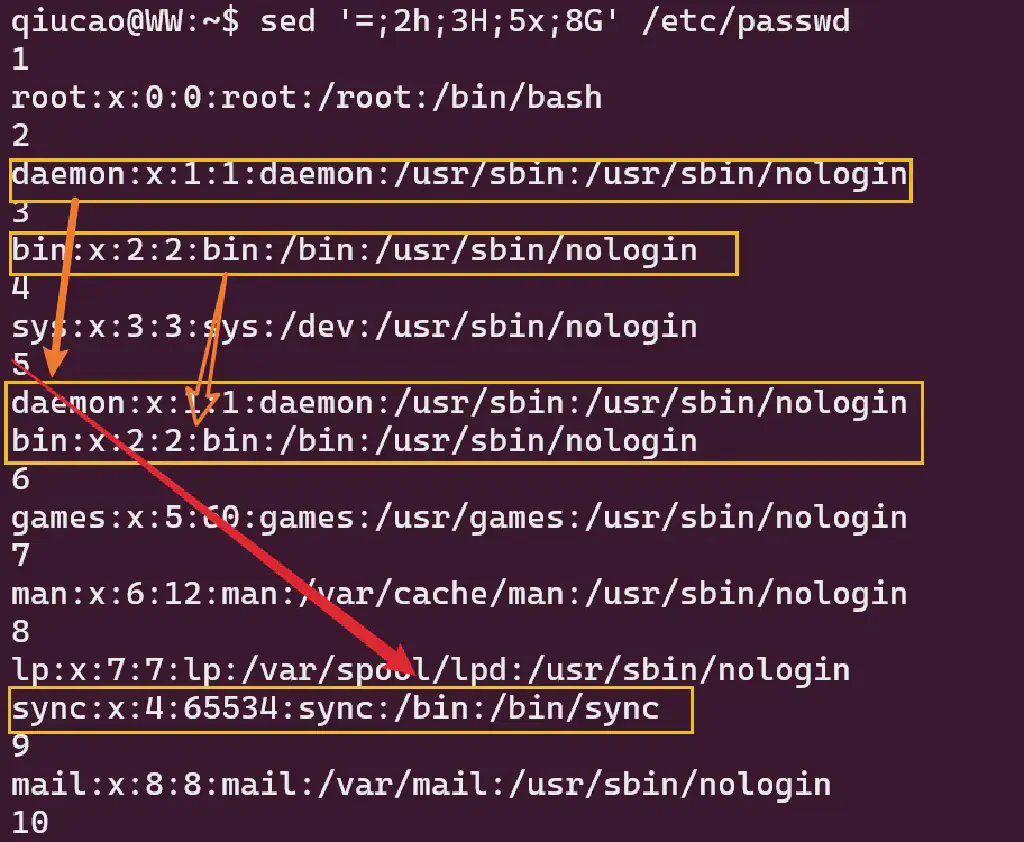
| sed '=;2h;3H;5x;8G' /etc/passwd
# 2h copies line 2 to the hold space
# 3H copies line 3 and appends it to the existing hold space
# 5x swaps the current pattern space with the hold space, so the copied content replaces the original line 5
# 8G appends the hold space content (originally the pattern space content of line 5) after the current pattern space, i.e. after line 8
|
Common Practical sed Examples
1. Delete Blank Lines
1
2
| sed -i '/^\s*$/d' test.txt
# Match lines containing only whitespace characters with a regular expression and delete them
|
2. Add Line Numbers to a File
1
2
3
| sed '=' test.txt | sed 'N;s/\n/\t/'
# First use sed to get the line numbers, added as a line before each line's default output
# Pipe the result to a second sed command, use the N command to merge the two lines, and replace the newline with a tab
|
1
2
| sed -nr 's/.*src="(.*\.png).*/\1/p' source.html
# A regular expression matches the image link; a capture group saves the path and replaces the entire original line
|
1
2
| sed -n '/ERROR/{=;p}' app.log
# Match lines in the log containing ERROR and print them along with their line numbers
|
Conclusion
The above is a systematic overview of the sed command from the Linux Text Processing Trio. A summary of the awk command will follow in a future article! For more extended testing skills, feel free to follow Qiucao’s systematic improvement course and reply with outline to get the detailed catalog.