DeepSeek has been all the rage in recent days, so I gave it a try myself, and it is indeed very powerful. The AI ToolKit extension for VS Code has also integrated the DeepSeek R1 model by now, so here I would like to share my hands-on experience of using DeepSeek inside VS Code to help us complete automated test scripts.
Installing AI ToolKit and Enabling DeepSeek
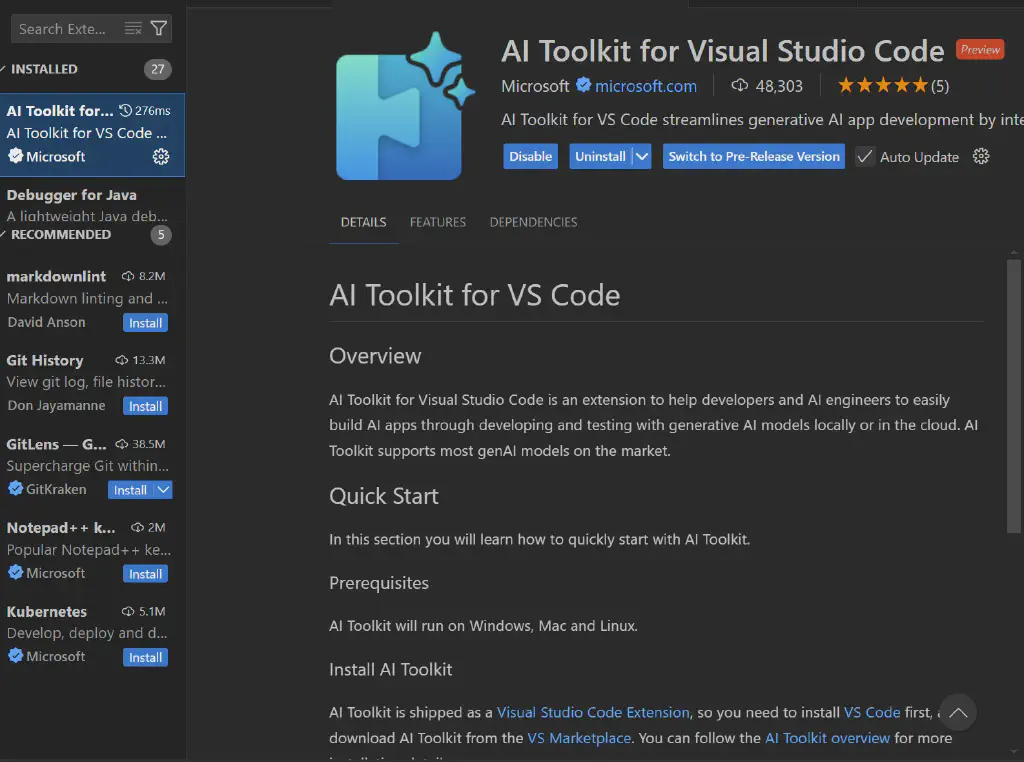
Microsoft officially provides an AI-assistance extension, namely AI ToolKit for Visual Studio Code. This extension can leverage a variety of open-source or commercial large language models, and it has now integrated the DeepSeek R1 model, allowing us to conveniently use DeepSeek within VS Code to assist with our code development.
First, find AI ToolKit in the extension marketplace and complete the installation.
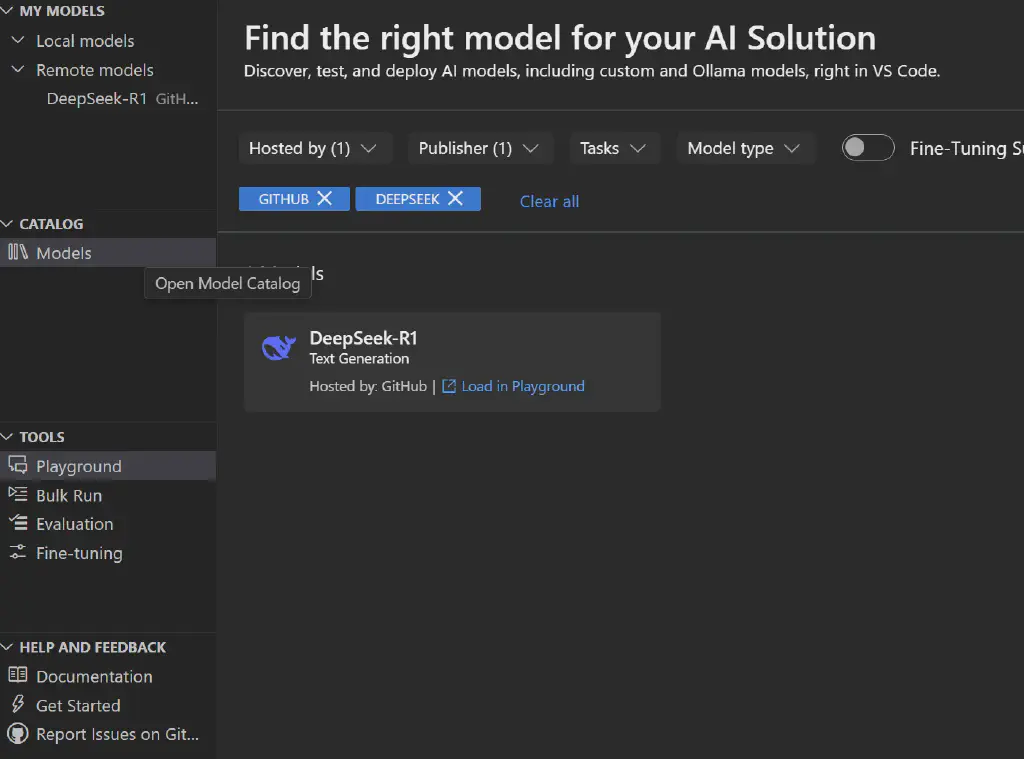
Once the extension is installed, on its page select the Models page in the Catalog, and use the DeepSeek-R1 model by applying the filters hosted by Github and publisher Deepseek.
AI-Assisted Script Generation
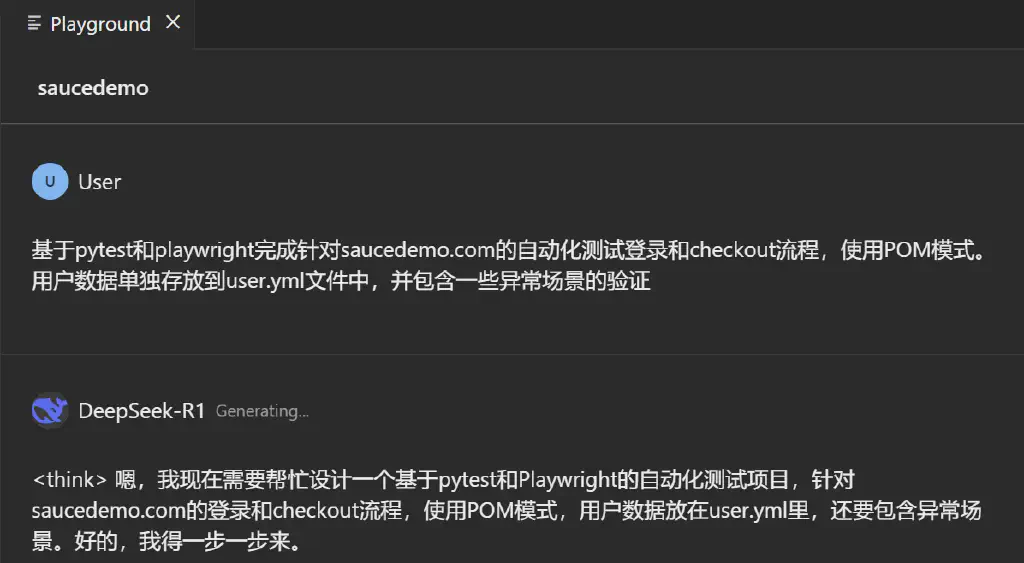
With the DeepSeek model available, we can create a new playground and let DeepSeek generate automation scripts for us. Below are the test scripts targeting saucedemo that I had DeepSeek generate.
Thinking Process
Hmm, I now need to help design an automated testing project based on pytest and Playwright, targeting the login and checkout flows of saucedemo.com, using the POM pattern, with user data stored in user.yml, and also covering exceptional scenarios. Alright, I’ll take it step by step.
First, I should determine the project structure. With the POM pattern, there are usually page objects, test cases, configuration files, data files, and so on. The directory structure might look like this:
- tests/
- pages/
- login_page.py
- inventory_page.py
- cart_page.py
- checkout_page.py
- test_login.py
- test_checkout.py
- pages/
- conftest.py
- user.yml
- pytest.ini
Then, the user data is stored in user.yml, which should contain different user types, such as a standard user, a locked user, a wrong password, a missing user, and so on. The test cases then need to read this data.
Next comes the implementation of the Page Object Model. Each page—such as the login page, inventory page, cart page, and checkout page—has its own class that encapsulates elements and operations. For example, LoginPage has methods for the username and password inputs, the login button, and error messages.
The test cases should use pytest’s parametrization to cover different user scenarios, such as a successful login, an invalid password, a locked user, and so on. At the same time, the checkout flow needs tests for the normal path, and possibly cases where the information is filled in incompletely.
Then consider setting up Playwright fixtures in conftest.py, such as the browser, page, and the fixtures for each page object. For example, before each test, navigate to the login page, and after login to the inventory page, so that preconditions can be handled.
As for exceptional scenarios, they include various error messages during login, and form validation during checkout, such as the first name being required. These test cases need to be written, and it must be verified that the error prompts are correct.
How should the user data be loaded? Possibly the pyYAML library can be used to read the user.yml file, which holds the data for different users. During testing, use @pytest.mark.parametrize to feed in different user data.
For example, the user data is divided into keys such as valid_users, invalid_password, and locked_user. When testing login, parametrize these cases to trigger different test cases.
When testing the checkout flow, you may need to log in first, then add a product to the cart, go to the cart, enter the checkout page, fill in the information, and complete the checkout. In this case, the normal test cases need valid data, while exceptional cases—such as leaving certain fields blank—need to verify the error prompts.
We also need to handle element selectors and Playwright’s locating methods, such as using CSS selectors or text-based locating. For example, the login page may locate the username and password inputs by id.
In addition, does the state need to be cleaned up after a test? For example, the products in the cart, or whether a logout is needed, or keeping each test case independent—fixtures may be used to ensure each one’s own state.
It may also be necessary to handle asynchronous operations, but Playwright handles waiting automatically, so no extra handling is needed for page navigation or element clicks.
Now, the concrete steps:
- Create the project structure and install dependencies: pytest, playwright, pyyaml.
- Write user.yml containing different types of user data.
- Implement the Page classes for each page, including element locating and operation methods.
- Define fixtures in conftest.py, such as initializing the page and creating instances of each page object.
- Write test cases, parametrize the user data, and cover both normal and exceptional flows.
- Handle waits and assertions in the tests to ensure elements exist or text is correct.
We need to check whether the test cases cover the following scenarios:
Login:
- Successful login with the correct username and password.
- An incorrect password triggers an error message.
- A locked user cannot log in.
- An empty username or password triggers an error.
Checkout:
- Filling in all the information normally completes the order.
- A missing required field (e.g., an empty first name) triggers an error.
- The cancel-order flow.
Now, what should the structure of user.yml look like?
Possibly like this:
users: valid_user: username: standard_user password: secret_sauce invalid_password_user: username: standard_user password: wrongpass locked_user: username: locked_out_user password: secret_sauce missing_username: username: "" password: secret_sauce missing_password: username: standard_user password: ""
When testing login, parametrize these cases. For example, for valid_user, login should succeed and redirect to /inventory.html. For invalid_password, it displays Epic sadface: Username and password do not match. For a locked user, it shows Epic sadface: Sorry, this user has been locked out. A missing username or password shows the corresponding error message.
For the checkout flow, the feasible steps are:
After logging in, add a product to the cart, click the cart icon, enter the cart page, click the checkout button, fill in the information, continue, and finish.
So the test cases need to parametrize whether the information filled in is correct. For example:
Information for the normal case:
first_name: John last_name: Doe zip: 12345
For an exceptional case, such as leaving the first name blank, whether an error is shown.
When writing these tests, you need to use the page object methods to complete each step, such as adding a product, going to the cart, filling in the information, the continue button, and so on.
Potential problem areas:
Whether elements are located correctly, especially whether dynamically generated content or asynchronously loaded parts need waiting. However, Playwright has an automatic waiting mechanism, so as long as elements are selected correctly, there should be no problem.
The places that need assertions include: whether the page URL after login is correct, whether the confirmation message after the order is completed exists, and whether the error prompt displays the correct text.
For example, after a successful login it should redirect to /inventory.html; after checkout is completed it should display “Thank you for your order”.
Also, the cart may need to be cleaned up, but since each test may run independently, or each test starts a new session, this can be handled in a fixture—for example, logging in and resetting the state before each test?
Or use a beforeEach-like fixture so that each test case starts in a certain state—for example, the page after login.
In addition, testing the shopping flow requires adding products to the cart, so the inventory page class needs a method for adding a product.
Page class example:
InventoryPage can have a method for adding a certain product, such as clicking the “Add to cart” button—for example, locating the corresponding button by the product name. However, this may be rather complex; perhaps a generic method on the page would be better.
Alternatively, InventoryPage has a method add_item_to_cart(item_name) used to click the add button for the corresponding product. This requires using Playwright’s locating methods, for example:
def add_item_to_cart(self, item_name): self.page.locator(f"text={item_name}").locator(“xpath=..”).locator(“button”).click()
However, this may need to be determined based on the actual DOM structure. The inspector may be needed to examine the element structure.
For example, the structure of each product item might look like:
So, find the corresponding name element, then find the button within its parent element.
Or, a simpler approach is that each product’s “Add to cart” button has a different id, such as add-to-cart-sauce-labs-backpack, or another attribute. It depends on the actual structure of the site.
The page after login may have multiple products, and the add button corresponding to each product may need to be located via its text, or through other attributes.
Now, we need to actually examine the structure of saucedemo.com. Playwright’s code generation feature may be used to obtain the correct selectors.
Suppose, for example, that the id of each product’s “Add to cart” button is dynamically generated or similar—for instance, for “Sauce Labs Backpack” the corresponding button’s id might be add-to-cart-sauce-labs-backpack—then we can locate it directly by this id.
In that case, InventoryPage can have a method:
def add_product_to_cart(self, product_name): product_id = product_name.lower().replace(’ ‘, ‘-’) self.page.click(f"#add-to-cart-{product_id}")
Of course, this requires checking whether the actual site structure is correct.
Suppose the correct product example here is Sauce Labs Backpack and its id is indeed like this; then the method works.
Also, whether the count on the cart icon is correct—after a product is added, the cart icon shows a count of 1. When entering the cart page, whether the corresponding product is present.
Note that after each operation, a page change may require a new Page object instance. For example, after clicking the cart in InventoryPage, it navigates to CartPage, so that operation should return an instance of CartPage so that operations can continue.
Then handling the return values of methods may become an issue. For example:
The method in InventoryPage:
def go_to_cart(self): self.page.click(".shopping_cart_link") return CartPage(self.page)
Like this, each navigation action returns a new Page object.
This requires handling the return of the corresponding page object in the methods of each page.
Then comes the assembly of the test flow:
When testing checkout, there may be many steps, so a large test case needs to be written and carried out step by step:
For example:
def test_checkout_process(login_page, inventory_page, checkout_data): # Log in login_page.login(“standard_user”, “secret_sauce”) # Add a product inventory_page.add_product_to_cart(“Sauce Labs Backpack”) inventory_page.go_to_cart() # Enter the cart page and click checkout cart_page.click_checkout() # Fill in the checkout information checkout_page.fill_shipping_info(checkout_data) checkout_page.continue_to_overview() # Confirm the order checkout_page.finish_checkout() # Assert whether it succeeded assert checkout_page.get_order_confirmation() == “Thank you for your order!”
Of course, this may involve navigation across many pages, and each pair of pages needs to be connected with the corresponding methods.
As for exceptional scenarios, for example, when filling in the information, if the first name is not entered and continue is clicked, an error prompt appears.
In this case, the test case may parametrize different data, for example:
@pytest.mark.parametrize(“first_name, last_name, zip_code, error_message”, [ ("", “Doe”, “12345”, “Error: First Name is required”), (“John”, “”, “12345”, “Error: Last Name is required”), (“John”, “Doe”, “”, “Error: Postal Code is required”), ]) def test_checkout_missing_fields(…, first_name, last_name, zip_code, error_message): # Omit the corresponding field when filling in the information checkout_page.fill_shipping_info(first_name, last_name, zip_code) checkout_page.continue_to_overview() assert checkout_page.get_error_message() == error_message
It may also be necessary to consider whether the error-message element is located correctly, and whether an error prevents moving to the next step.
Now, the question may be how to organize this data and the page methods.
In addition, regarding loading the user data, the test cases need to load it from a YAML file. One possible approach is to write a fixture in conftest.py that reads the YAML data and then parametrizes the test cases.
But pytest’s parametrization may need to be handled in a specific way, possibly converting the YAML data into test parameters, or using an external data source to parametrize the tests.
For example, read all the user data from user.yml in conftest.py and create a parametrized fixture for the login tests.
Or, the data in the YAML file can be read directly in the test cases and parametrized.
For example:
import yaml
def load_users(): with open(‘user.yml’) as f: data = yaml.safe_load(f) return data[‘users’]
Then in the test case use:
@pytest.mark.parametrize(“user”, [ (“valid_user”), (“invalid_password_user”), (“locked_user”), # … other cases ], indirect=True) def test_login(login_page, user): login_page.login(user[‘username’], user[‘password’]) # assertions, etc.
However, how to convert the data into parameters may require more careful handling, such as extracting each user data item into parameters for each test instance.
A possibly better approach is to write the different user situations as separate test data items. For example, list the keys of the different user-type data, then load the corresponding parameters from the data based on these keys.
Or, when parametrizing, import all the user data as parameters.
For example:
import yaml import pytest
with open(‘user.yml’) as f: user_data = yaml.safe_load(f)[‘users’]
login_test_data = [ (user_data[‘valid_user’], True, None), # normal user, login succeeds, no error (user_data[‘invalid_password_user’], False, ‘Epic sadface: Username and password do not match’), (user_data[’locked_user’], False, ‘Epic sadface: Sorry, this user has been locked out.’), # … other cases ]
@pytest.mark.parametrize(“user, success, error_msg”, login_test_data) def test_login_user(login_page, user, success, error_msg): login_page.navigate() login_page.login(user[‘username’], user[‘password’]) if success: assert login_page.current_url == ‘https://www.saucedemo.com/inventory.html' else: assert login_page.get_error_message() == error_msg
In this case, each user data item in user.yml needs to have an error key, or the mapping of error messages needs to be handled during the preparation of the parametrization.
However, this way of passing parameters may be more flexible, allowing the expected result to be specified at the same time.
For the YAML structure, more detailed data items may be needed, with each user data item containing the expected error message.
For example, part of user.yml:
valid_user: username: standard_user password: secret_sauce expected: success: true error: null
invalid_password_user: username: standard_user password: wrong expected: success: false error: “Epic sadface: Username and password do not match”
locked_user: username: locked_out_user password: secret_sauce expected: success: false error: “Epic sadface: Sorry, this user has been locked out.”
This makes the parametrization more structured. But when writing the YAML, the expected result of each case needs to be considered.
In this way, the parameters of the test cases may be the structure read directly from the YAML, and then the test case parameters are generated by parsing the different user groups.
However, this may be somewhat complex. Another approach is to define each test case as an item in the YAML, containing the input data and the expected result.
In short, this part may require more design.
Then, regarding the Playwright fixture setup, in conftest.py you can use the fixtures provided by pytest-playwright—for example, the page fixture from the pytest-playwright plugin. However, this may require installing the pytest-playwright library and running the playwright installation step.
The dependencies to install include:
pytest-playwright playwright pyyaml
Run playwright install to install the browsers.
Then, in conftest.py, define how to initialize each page object and inject them into the test cases as fixtures.
For example:
import pytest from playwright.sync_api import Page from pages.login_page import LoginPage from pages.inventory_page import InventoryPage
Importing Other Pages
@pytest.fixture def login_page(page: Page): return LoginPage(page)
@pytest.fixture def inventory_page(page: Page): return InventoryPage(page)
And so on. In this way, if a test case needs to use a particular page object, it can simply declare the required fixture in its parameters.
For example, a test case function may receive login_page and inventory_page as parameters.
Next, examples of each Page class.
The LoginPage class looks like this:
class LoginPage: def init(self, page): self.page = page self.username_input = page.locator("#user-name") self.password_input = page.locator("#password") self.login_button = page.locator("#login-button") self.error_message = page.locator(".error-message-container")
| |
But in reality the selectors need to be adjusted according to the actual HTML structure of saucedemo.com. For example, the error-message element might be a div.error-message-container with a data-test=“error” attribute, whose text may be inside a child element.
For instance, on the actual site, the HTML of the error message might be:
Then, the error_message locator needs to target the text of the h3 element. Or, target the entire container and use inner_text() to get the text.
Or, the correct selector might be:
error_message = page.locator(’[data-test=“error”]’)
But Playwright supports multiple ways of selecting, such as using the data-testid attribute, so when writing the code you need to verify the correct way of locating elements.
So a possibly better way is to use the data-test attribute to select elements—for example, the data-test attributes on the login page:
Username input: data-test=“username”
Password input: data-test=“password”
Login button: data-test=“login-button”
Error-message element: data-test=“error”, so its element can be located as:
self.error_message = page.locator(’[data-test=“error”]’)
Then its text content can be obtained with error_message.inner_text(), which contains the key part of the error message.
As for the other pages, such as the inventory page and the cart page:
InventoryPage may have a method for adding a product to the cart, a method for navigating to the cart, and perhaps a display of the cart count. For example:
class InventoryPage: def init(self, page: Page): self.page = page
def add_product_to_cart(self, product_name): # Here we assume how the add button corresponding to the product name is located; suppose the data-test attribute has a corresponding add-to-cart button, e.g. data-test=“add-to-cart-sauce-labs-backpack” product_id = product_name.lower().replace(’ ‘, ‘-’) self.page.locator(f’[data-test=“add-to-cart-{product_id}”]’).click()
def get_cart_count(self): return self.page.locator(’.shopping_cart_badge’).inner_text()
def go_to_cart(self): self.page.locator(’.shopping_cart_link’).click() return CartPage(self.page)
The CartPage class may have a checkout button:
class CartPage: def init(self, page: Page): self.page = page
| |
The CheckoutPage class:
class CheckoutPage: def init(self, page: Page): self.page = page self.first_name_input = page.locator(’[data-test=“firstName”]’) self.last_name_input = page.locator(’[data-test=“lastName”]’) self.postal_code_input = page.locator(’[data-test=“postalCode”]’) self.continue_button = page.locator(’[data-test=“continue”]’) self.error_message = page.locator(’[data-test=“error”]’)
def fill_shipping_info(self, first_name, last_name, postal_code): self.first_name_input.fill(first_name) self.last_name_input.fill(last_name) self.postal_code_input.fill(postal_code)
def continue_to_overview(self): self.continue_button.click()
def get_error_message(self): return self.error_message.inner_text().strip()
Then, on the page after the information is filled in, there may be a finish button, in the CheckoutOverviewPage class:
class CheckoutOverviewPage: def init(self, page: Page): self.page = page self.finish_button = page.locator(’[data-test=“finish”]’) self.confirmation_message = page.locator(’.complete-header’)
def finish_checkout(self): self.finish_button.click()
def get_confirmation_message(self): return self.confirmation_message.inner_text()
Of course, these need to be adjusted according to the actual page structure, such as whether the confirmation-message element is correct.
In this way, the overall test flow can be chained together through the methods of each page.
Now the steps for writing the test cases:
Testing the login flow:
Parametrize different user data and determine whether login succeeds, or whether the correct error prompt appears.
For example:
In test_login.py:
import pytest from playwright.sync_api import Page
@pytest.mark.parametrize(“user_key, expected_success, expected_error”, [ (“valid_user”, True, None), (“invalid_password_user”, False, “Epic sadface: Username and password do not match”), (“locked_user”, False, “Epic sadface: Sorry, this user has been locked out.”), (“missing_username”, False, “Epic sadface: Username is required”), (“missing_password”, False, “Epic sadface: Password is required”), ]) def test_login(login_page, user_key, expected_success, expected_error): # Load user data from YAML; assume there is a fixture that can load all the test user data users = load_users() user = users[user_key] login_page.navigate() login_page.login(user[‘username’], user[‘password’])
if expected_success: assert login_page.page.url == “https://www.saucedemo.com/inventory.html" else: assert login_page.get_error_message() == expected_error
The load_users function needs to be written, or a fixture used to pass data to the test cases.
Here load_users might be a fixture in conftest.py:
import pytest import yaml
@pytest.fixture def users(): with open(‘user.yml’) as f: data = yaml.safe_load(f) return data[‘users’]
Then the test case can receive users as a fixture:
def test_login(login_page, users, user_key, expected_success, …): user = users[user_key] …
But this kind of parametrization may need to be combined with the use of indirect parameters, or the user data may need to be obtained dynamically during parametrization.
Or, map the parametrized data to the user keys and obtain the correct user data through a dictionary.
This may require a deeper handling of pytest’s parametrization, such as using indirect parametrization, passing the user key as a parameter, and then obtaining the corresponding user’s data inside the test function.
Or, this way of passing parameters may not be very straightforward, and the parametrization structure may need to be redesigned.
Perhaps the best way is to directly specify the keys of the user data in the parametrization list, and then use that key in the test case to index the corresponding data in the users fixture.
For example:
@pytest.mark.parametrize(“user_key, expected_success, expected_error”, [ (“valid_user”, True, None), (“invalid_password_user”, False, “Epic sadface: Username and password do not match”), (“locked_user”, False, “Epic sadface: Sorry, this user has been locked out.”), (“missing_username”, False, “Epic sadface: Username is required”), (“missing_password”, False, “Epic sadface: Password is required”), ]) def test_login(login_page, users, user_key, expected_success, expected_error): user = users[user_key] login_page.navigate() login_page.login(user[‘username’], user[‘password’]) if expected_success: assert login_page.page.url == “https://www.saucedemo.com/inventory.html" else: assert login_page.get_error_message() == expected_error
It needs to be ensured that the corresponding keys exist in user.yml and that the data for each user is correct.
For the normal test of the checkout flow:
In test_checkout.py:
def test_successful_checkout(login_page, inventory_page, users): valid_user = users[‘valid_user’] login_page.login(valid_user[‘username’], valid_user[‘password’]) inventory_page.add_product_to_cart(“Sauce Labs Backpack”) cart_page = inventory_page.go_to_cart() checkout_page = cart_page.checkout() checkout_page.fill_shipping_info(“John”, “Doe”, “12345”) checkout_page.continue_to_overview() overview_page = CheckoutOverviewPage(checkout_page.page) overview_page.finish_checkout() assert overview_page.get_confirmation_message() == “Thank you for your order!”
This requires defining the corresponding elements and methods of the CheckoutOverviewPage class.
For exceptional tests:
For example, omitting a required field when filling in the information:
@pytest.mark.parametrize(“first_name, last_name, zip_code, expected_error”, [ (””, “Doe”, “12345”, “Error: First Name is required”), (“John”, “”, “12345”, “Error: Last Name is required”), (“John”, “Doe”, “”, “Error: Postal Code is required”), ]) def test_checkout_error_messages(login_page, inventory_page, users, first_name, last_name, zip_code, expected_error): valid_user = users[‘valid_user’] login_page.login(valid_user[‘username’], valid_user[‘password’]) inventory_page.add_product_to_cart(“Sauce Labs Backpack”) cart_page = inventory_page.go_to_cart() checkout_page = cart_page.checkout() checkout_page.fill_shipping_info(first_name, last_name, zip_code) checkout_page.continue_to_overview() assert checkout_page.get_error_message() == expected_error
Here, it needs to be confirmed whether the actual error prompt is text like this. For example, on the reqreal site, when the first name is left blank and you continue, whether the error prompt is really “Error: First Name is required”. The actual page needs to be examined—perhaps whether the error message is contained in a data-test=“error” element, or whether it is some other structure.
In summary, the whole project needs:
- Correctly configure each page class of the POM.
- Correctly read the user data and parametrize the test cases.
- Handle the flows of different test scenarios, especially that the Test checkout flow may require continuous page navigation and state maintenance.
- Assert on exceptional cases, such as the correctness of error messages.
It may also be necessary to confirm the synchronization of page elements. Although Playwright waits automatically, for example, confirming certain elements on the page to check whether the navigation after clicking a button has completed may make things more stable.
For some asynchronous actions, such as elements changing after a button click, no waiting is needed because Playwright has already handled it internally.
Overall, this design should be able to cover the required automated testing needs. Next, I need to write the concrete code files based on these ideas and verify that they work correctly.
Concrete Implementation
To complete the automated testing of the login and checkout flows for saucedemo.com based on pytest and Playwright, following the POM pattern, here is the detailed implementation plan:
Project Structure
| |
Installing Dependencies
- Install the required libraries:
| |
File Implementation
user.yml
| |
pages/login_page.py
| |
pages/inventory_page.py
| |
pages/cart_page.py
| |
pages/checkout_page.py
| |
pages/checkout_overview_page.py
| |
conftest.py
| |
test_login.py
| |
test_checkout.py
| |
Key Points and Explanation
POM Design Pattern:
- Each page (such as the login page or the inventory page) is encapsulated as a class, with page elements and operations abstracted into methods, thereby improving code reusability and maintainability.
Data-Driven Testing:
- User data is separated from the test code and stored in a YAML file, which improves maintainability and makes it easy to add new test scenarios.
Exceptional Scenario Coverage:
- Parametrized tests verify whether different erroneous inputs (such as a locked user, a wrong password, or a missing required field) trigger the correct error prompt.
Fixture Management:
- pytest fixtures are used to manage the browser and page objects, ensuring the independence of each test case and reducing duplicate code.
Playwright Auto-Waiting Mechanism:
- Playwright’s built-in auto-waiting ensures that elements are in an interactable state before being operated on, enhancing test stability.
This solution covers both normal and exceptional business flows, ensuring automated verification of the core functional points (login, cart, checkout) and improving software quality.
Conclusion
Referring to the results given, they can be executed successfully with almost no fine-tuning, which indeed greatly improves our efficiency in automation implementation. What is most valuable is that the thinking process provided by DeepSeek is also of great reference value for the key points of our code implementation and test case design!