Preface
It has been a long time since I last updated the blog, because I have been putting together course content on hands-on Playwright testing frameworks. Now that the course is complete, I’m writing this post to introduce it (a shameless plug, haha).
The course is on the CSDN learning channel—feel free to check it out~
PyTest + PlayWright Automation Testing Framework in Action
Why Playwright?
Playwright, compared with some long-established tools, has not been around for very long: its first official release only came out in 2020, though beta versions had been available before that. Precisely because the tool is relatively new, it enjoys a late-mover advantage. Moreover, Playwright comes from Microsoft and is backed by a major company, with strong support on all fronts. As a result, among web automation testing tools it is currently gaining momentum very rapidly and is widely regarded as the new-generation automation testing tool that can replace Selenium, the long-reigning champion of traditional web automation.
Of course, the tool’s popularity is not only because it is a product of a big company; it also naturally owes much to some of its own notable and obvious strengths.
The Playwright development team consists of core members from another tool, Puppeteer (a web automation tool launched by Google based on Chrome). You could say Playwright is built on the foundation of Puppeteer. And Puppeteer itself was once considered one of the “three carriages” of web automation in the post-Selenium era, so Playwright can be said to stand on the shoulders of giants: it not only retains many of Puppeteer’s strengths, but also improves on some of Puppeteer’s own shortcomings, making it more complete.
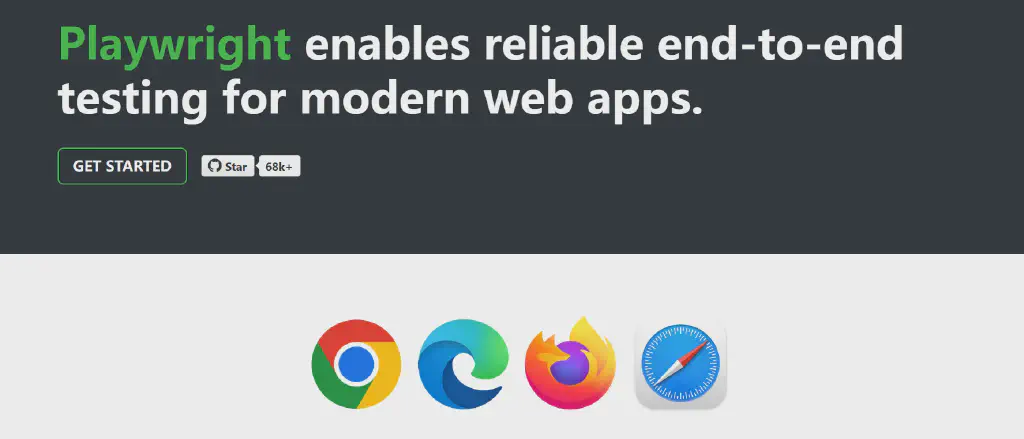
One major limitation of Puppeteer is that it only supports the Chrome browser, whereas Playwright has built-in support for multiple mainstream browsers. Besides Chrome and Edge, it also supports Firefox and Safari, satisfying mainstream browser coverage for web automation.
Playwright supports implementations in different programming languages. In addition to Node.js, which Puppeteer originally supported, it also supports Java and Python, and of course Microsoft’s own .NET.
Playwright also supports a wider range of extended advanced features.
The Official Site’s Description of Playwright’s Advantages
Multi-browser, cross-platform, multi-language, and support for mobile web.
A resilient framework that proactively avoids many of the problems that make UI automation unstable, including features such as auto-waiting, dynamic assertions, and action tracing.
An architecture better matched to modern browsers, with process-level isolation that uses the concept of contexts to distinguish different test scenarios without interfering with one another. It also strengthens handling of special front-end automation cases such as Frame and shadow DOM.
More thorough isolation and faster execution. Playwright’s context mechanism ensures basic isolation of browser processes and millisecond-level creation speed. Its speed advantage also comes from Playwright being based on the WebSocket protocol, a long-lived, full-duplex, two-way communication protocol.
A variety of auxiliary tools, including automated code generation and recording, assistance with locating page elements, and powerful tracing tools.
How It Works
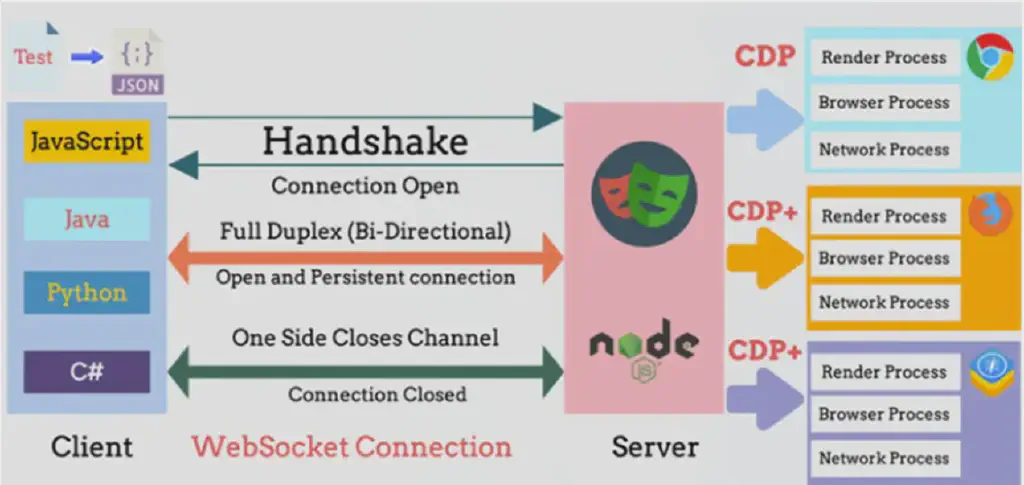
Playwright is an optimized product built on top of Puppeteer, and its implementation principle can be described as a synthesis of the strengths of Puppeteer and Selenium. Playwright has a built-in server module implemented on Node.js; this module connects and communicates with client programs written in various languages through the WebSocket protocol, taking advantage of WebSocket’s long-lived, bidirectional operation.
It then controls and drives Chromium-based browsers through the CDP protocol. Playwright also supports Firefox and WebKit here (in fact, Playwright itself implements a CDP protocol for these two browsers, called the CDP plus protocol here).
There is another difference: Playwright actually builds the browser versions into the tool itself, which shields away the differences caused by different browser versions.
Where Does a Test Framework Fit in the Automation Testing Tool Landscape?
When we talk about automation, we often mention test scripts, automation tools, frameworks, and platforms. So what exactly is the difference between these concepts, and where does the framework we are introducing actually sit within the overall automation testing system?
It can be summarized with the layered diagram below:
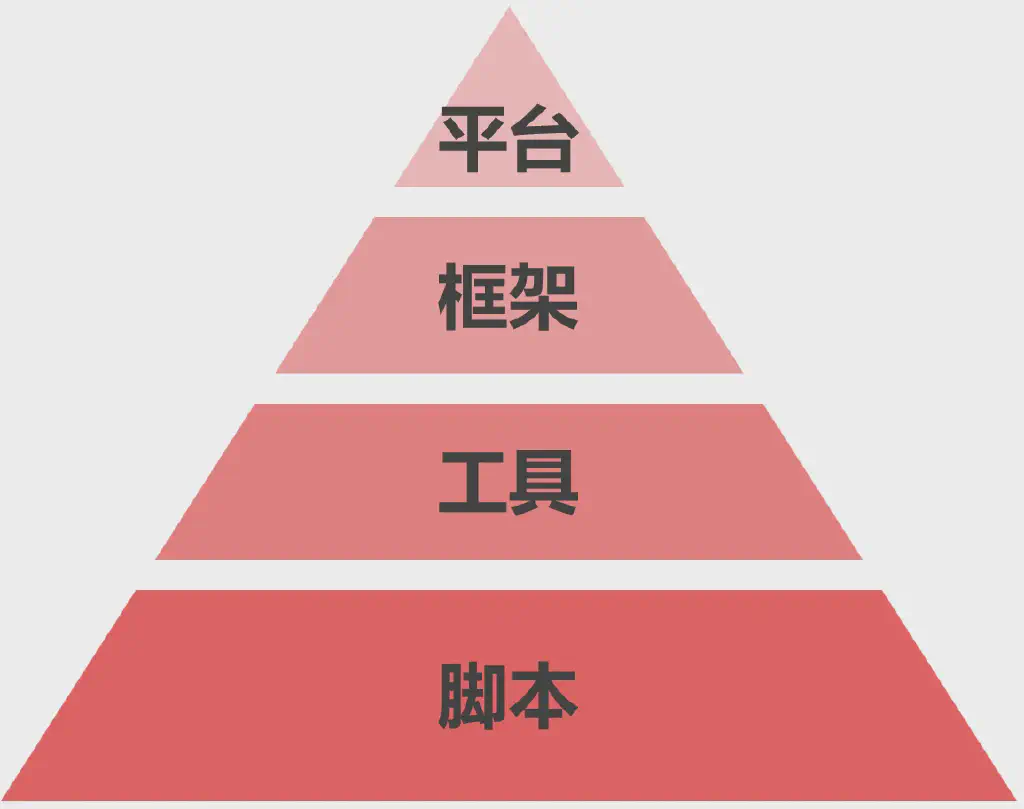
Script level. This is mostly about using test scripts to accomplish automation testing tasks or build testing aids. It includes test code we write in various programming languages, as well as shell and batch scripts of the operating system—all of which belong to the script level. Scripts are the direct embodiment of automation testing logic. Many record-and-playback automation tools, which convert manual operations into test scripts, also do their work at this level. It is the most fundamental part of automation testing.
Tool level. This layer is responsible for driving the scripts: how exactly do scripts drive program execution, and how are test actions and results judged? These are the jobs of automation testing tools. Different types of testing usually have different tools. The ones we often mention—Selenium, Appium, Postman, QTP, JMeter, and so on, including Playwright—can mainly be understood as testing tools. They can perform different types of automation testing such as Web, mobile applications, APIs, and performance.
Framework level. It addresses the organization of automation testing, bringing a complete set of automation test cases together. This includes case selection, control of the execution process, and aggregated presentation of results. At the framework level, the most important thing is that it supports different testing tools and can integrate different types of automation testing. Common testing frameworks such as Pytest, JUnit, and Robot Framework are all excellent automation testing frameworks. Frameworks like JUnit and Pytest began as unit-testing frameworks, and PyTest evolved by drawing on JUnit, but that does not mean their scope of application is limited to unit testing—they are equally applied to integration testing and system testing. Just as automation testing does not belong to any one specific testing phase, we should not confuse a particular testing tool or framework with a testing phase; these are concepts on two different dimensions.
Platform level. An automation testing platform organizes automation testing at a higher level. It needs to implement scheduling of test tasks, management of test environments, management and allocation of test assets such as test data and test scripts, and interconnection with other development processes—for example, the interconnection and integration of bug management, code management, document management, and configuration management with various other development tools.
Course Outline
This course of mine is mainly a systematic introduction combining the Pytest and Playwright tools, teaching how to build a production-ready automation testing framework, including integration with continuous integration systems.
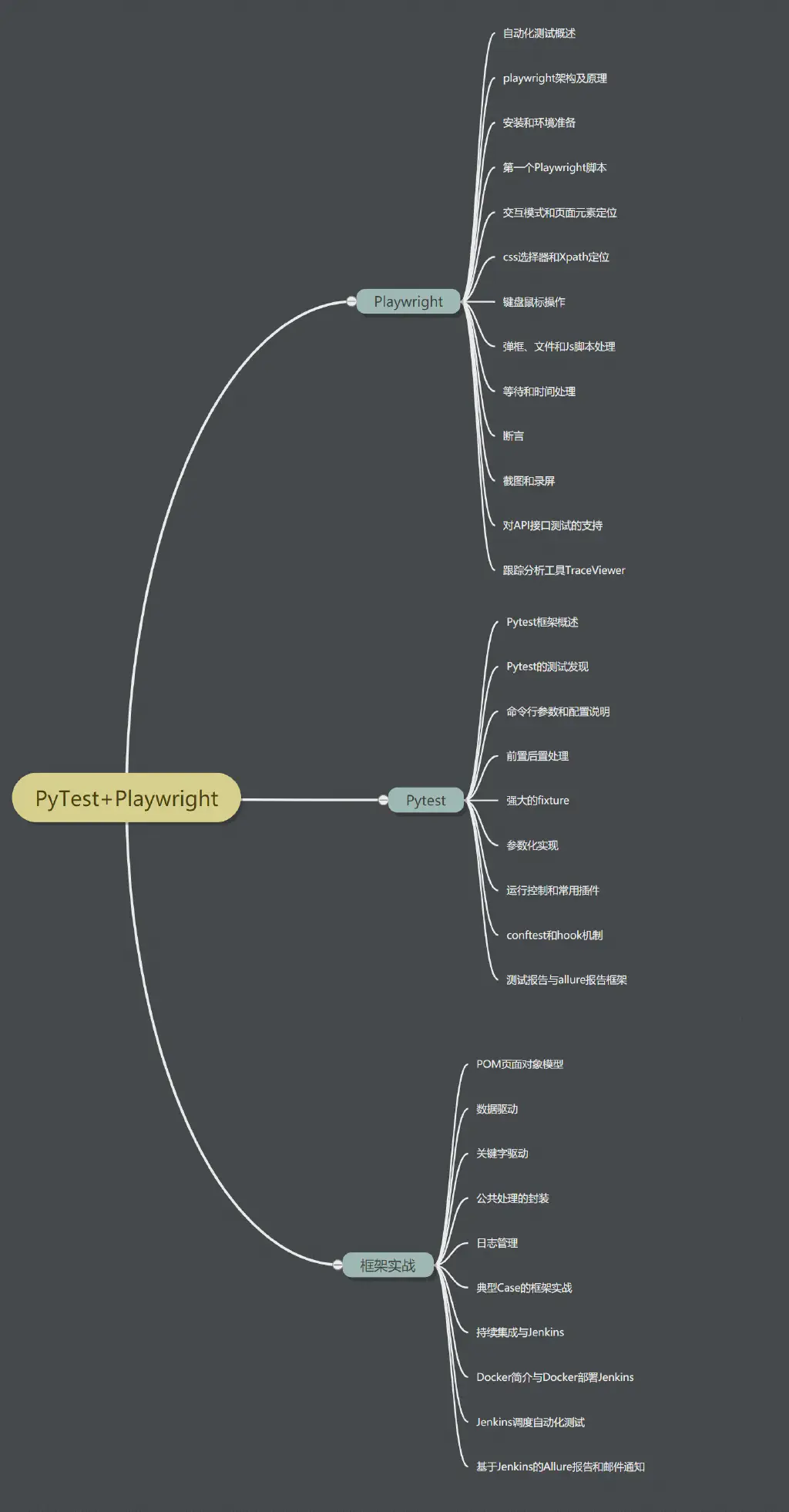
If you’re interested, feel free to check it out—here is the link:
PyTest + PlayWright Automation Testing Framework in Action
It’s currently in the launch period with a 20% discount~~