Preface
Software code is the core asset of any software development team. Branch management is the primary way a team coordinates code synchronization, integration, and conflict resolution among multiple people when collaborating.
This article is compiled from reading notes on the branching model by software guru Martin Fowler.
Base Patterns
Source Branch
All changes are recorded on the same branch.
Definition of a branch:
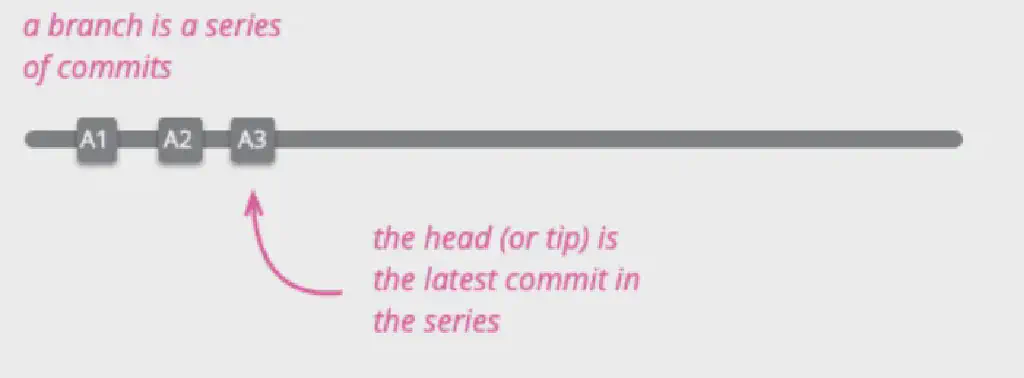 Creating a branch:
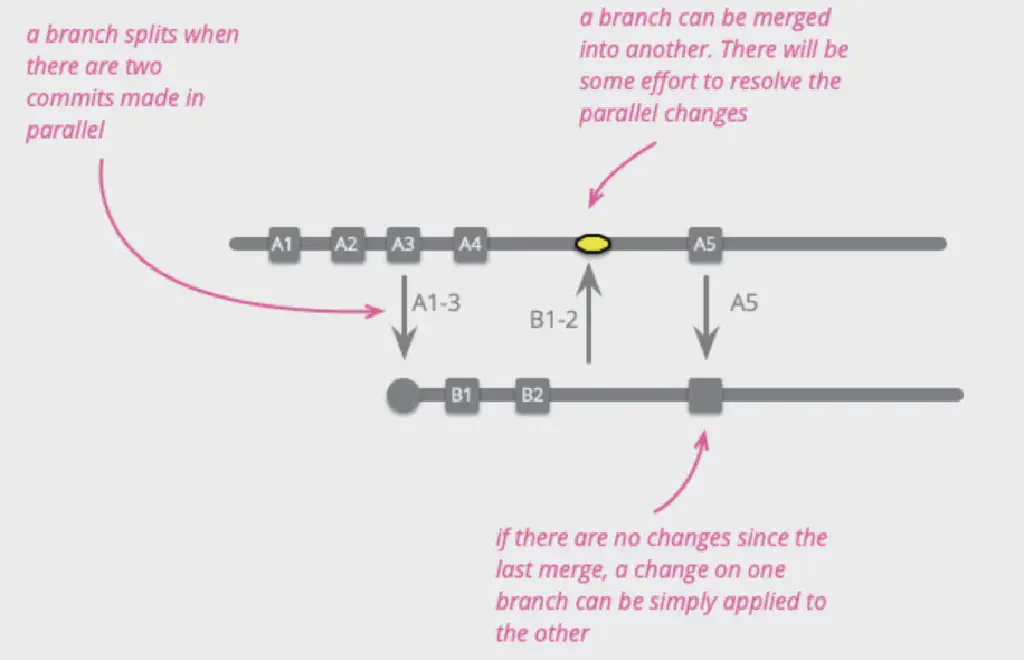
Two different developers pull their own development branches based on the main branch:
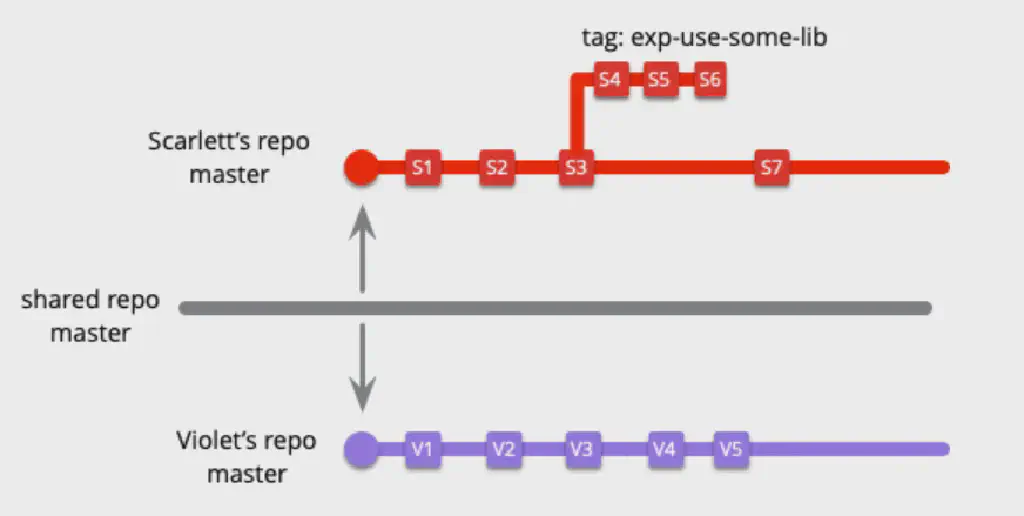
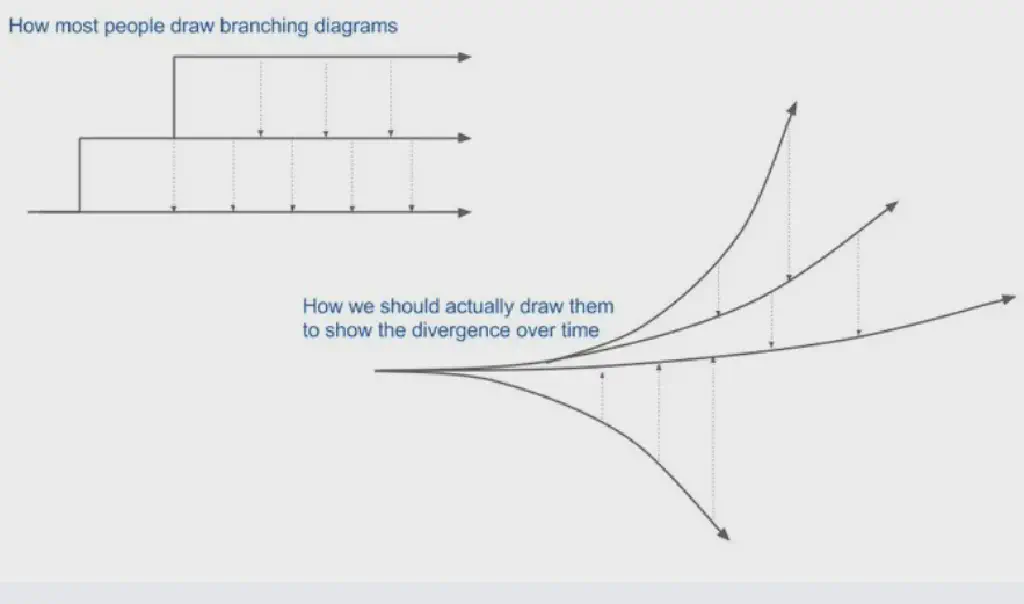
Jonny LeRoy pointed out that when we draw branch lines, we actually overlook the increase in complexity that builds up over time.
Definition of the Mainline:
Master, Trunk
It is the single shared branch that reflects the current actual state of the product.
You can obtain the current product version state at any time and develop based on it.
Healthy Branch:
Perform automated builds and tests for every commit to ensure no faults are introduced into the current branch (a working, fault-free branch).
Advantages:
- A healthy shared branch prevents new branches pulled from it from working on a faulty foundation.
- A healthy branch is easier to release directly to production.
- Keeping a healthy branch at all times greatly reduces the workload of integration and lowers potential risks.
- It facilitates differential debugging. (You can remove the commit that failed debugging and keep only the healthy commits.)
- If a problem occurs when integrating into the mainline, you can confirm with certainty that it is caused by a conflict rather than a code error.
It can be a shared branch or your own branch. Self-testing code is the core of a healthy branch; self-tests should produce results quickly (on the order of minutes).
Integration Patterns
Mainline Integration
Developers pull code from the mainline to develop, integrate, and push healthy changes back to the mainline.
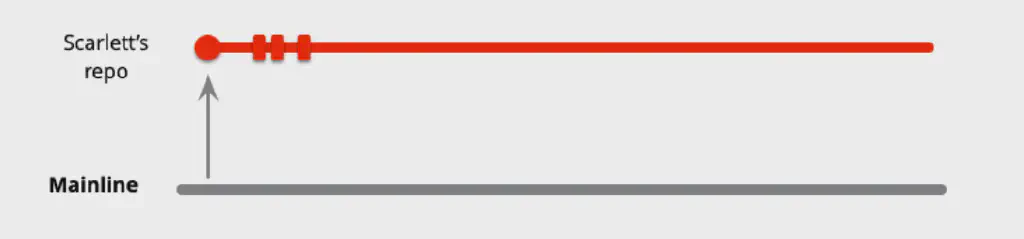 Pull a branch from the mainline to your local machine and develop on the local branch.
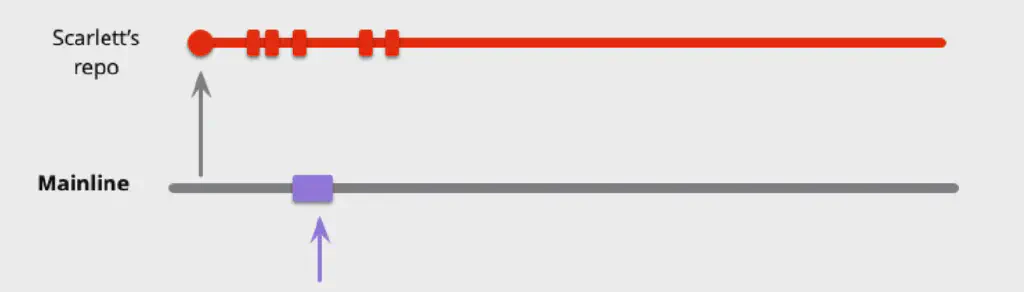 During development, other developers have already committed changes to the mainline branch.
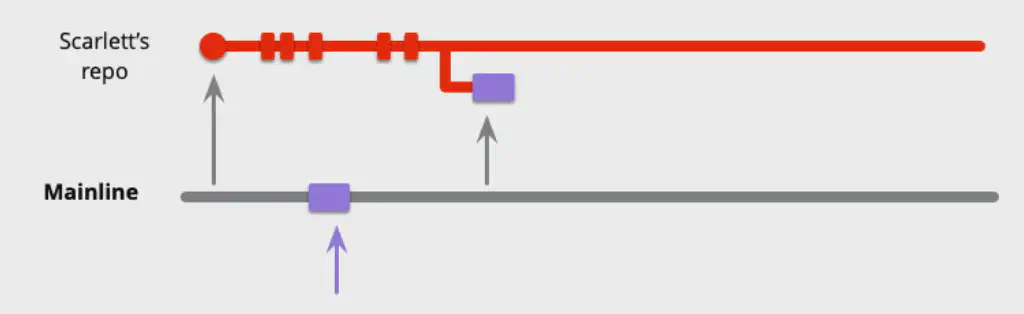 At this point, if you want to commit to the mainline, you first need to merge in the other changes.
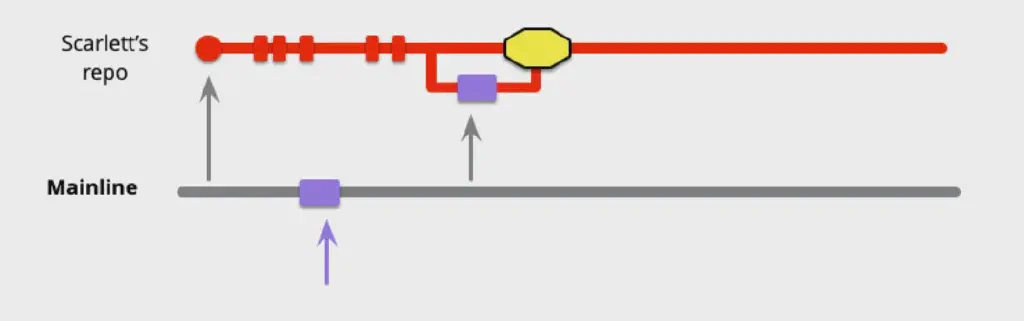 Sometimes there are conflicts between local modifications and already-committed changes; in that case you need to resolve the conflicts first.
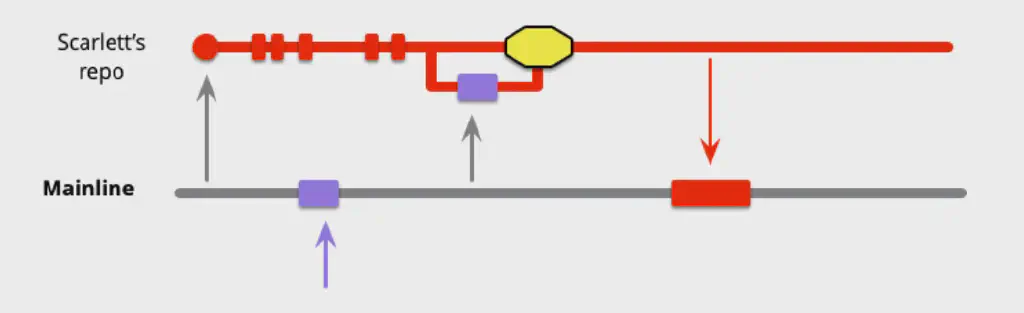 Then commit the modified, self-tested healthy code back to the mainline branch.
Using a mainline means we will practice the mainline integration pattern.
Feature Branch
Pull an independent branch for each functional feature, and integrate it back into the mainline after the feature is complete.
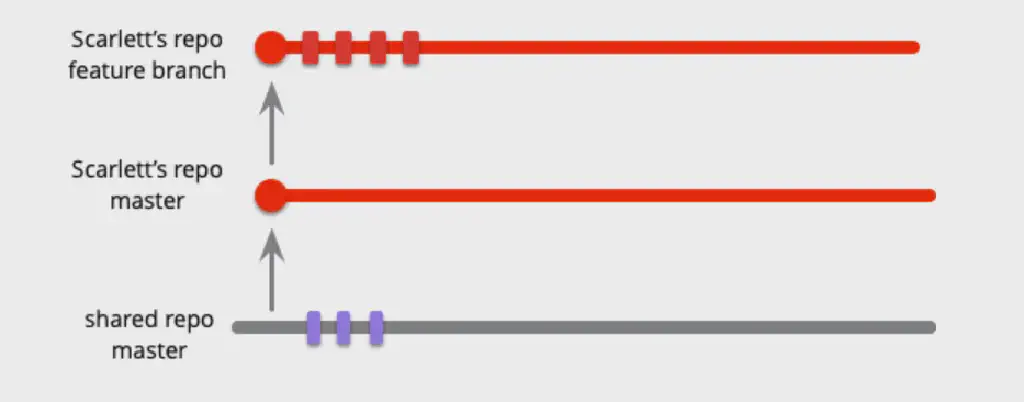 Pull different feature branches from the mainline and develop on each separately.
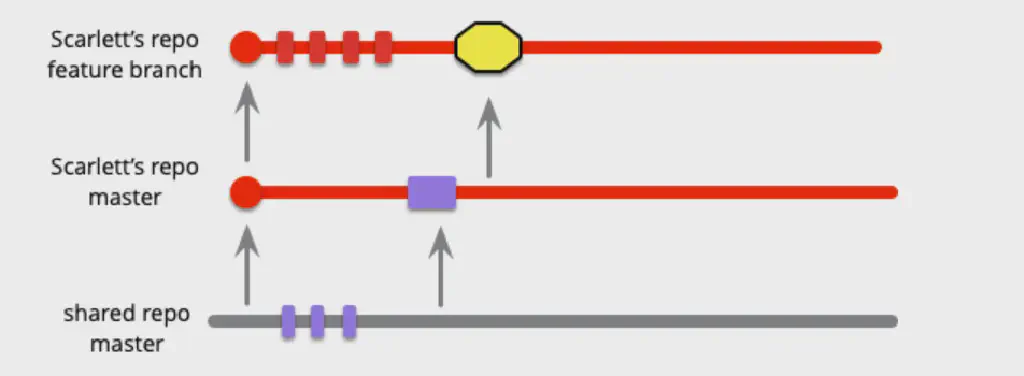 During development, continuously pull the latest code from the mainline; if there are other feature changes, integrate and resolve conflicts in a timely manner (locally).
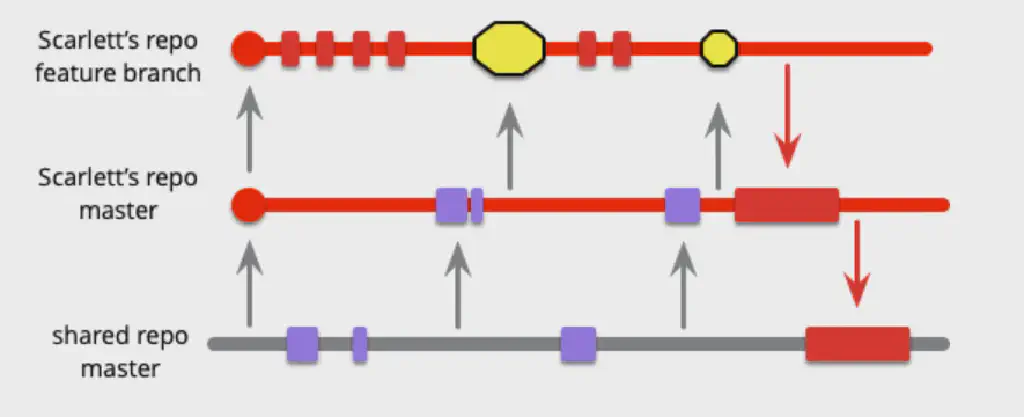 After the feature is fully developed, integrate it back into the mainline. (The affected conflicts have already been resolved locally, so all other feature branches can pull the changes directly without any conflicts to resolve.)
Low-Frequency Integration
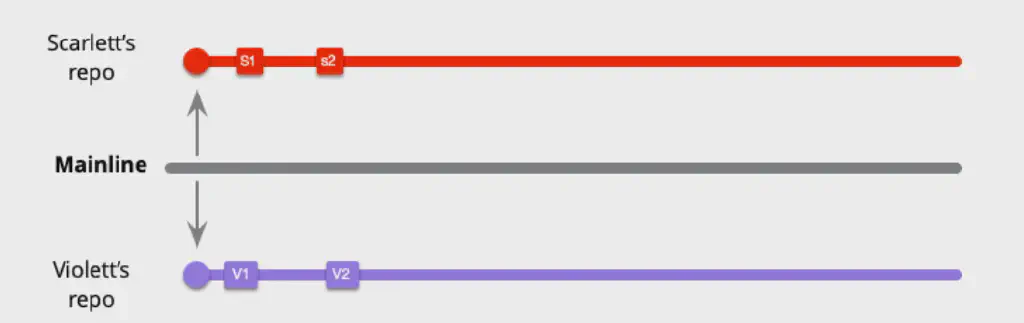
Several local commits have been made on each of two independent development branches, but they have not been pushed to the mainline.
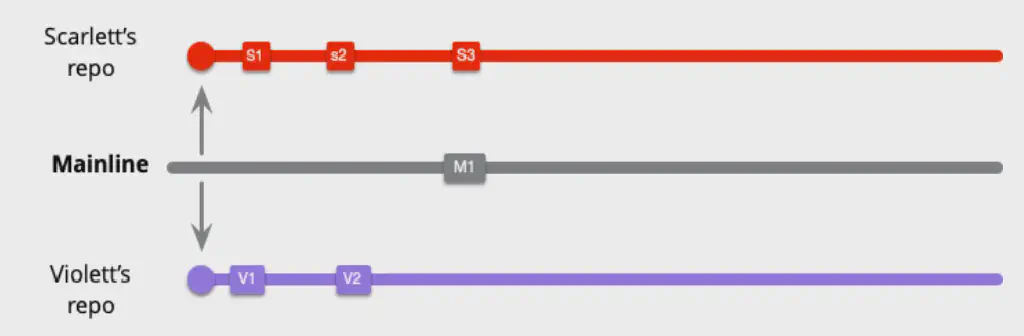 Changes have been merged into the mainline.
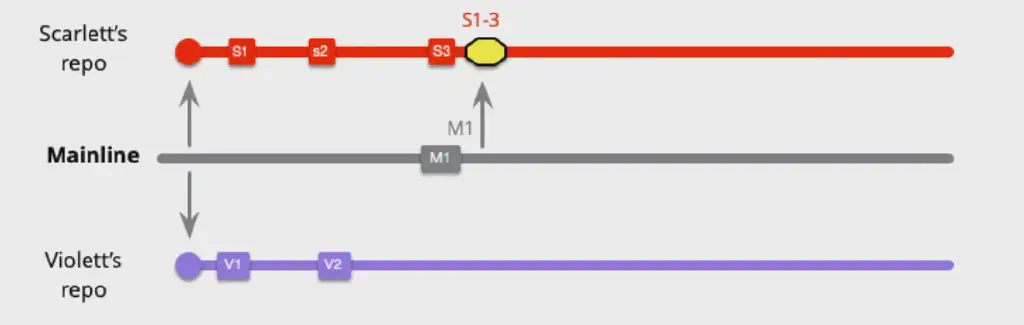 The development branches need to pull the changes and merge them into their local branches (resolving conflicts).
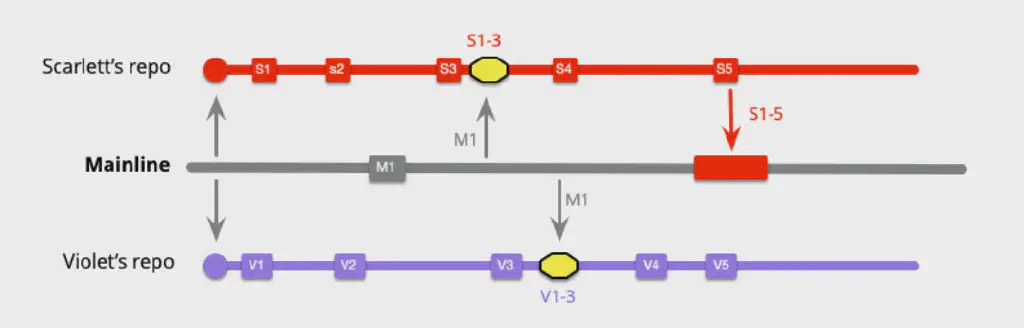 On branch A, commits 4 and 5 are completed and then pushed to the mainline.
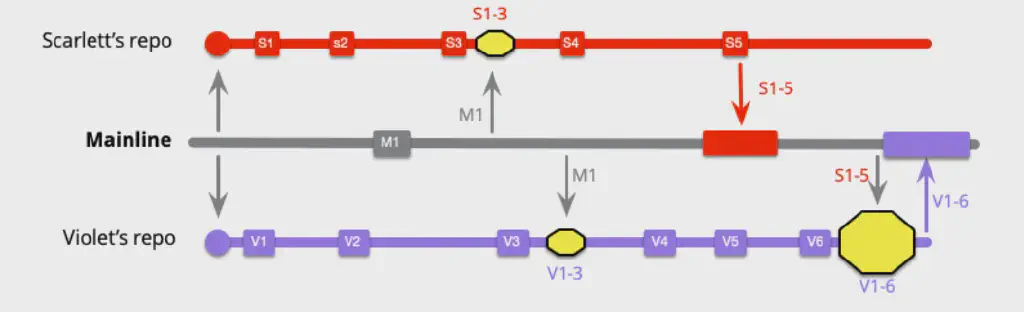 After commits 4, 5, and 6 are completed on branch B, it needs to locally merge in A’s commits from the mainline and, after integration, push to the mainline. (The size of the local merge represents the workload.)
High-Frequency Integration
What if every commit is integrated and pushed to the mainline?
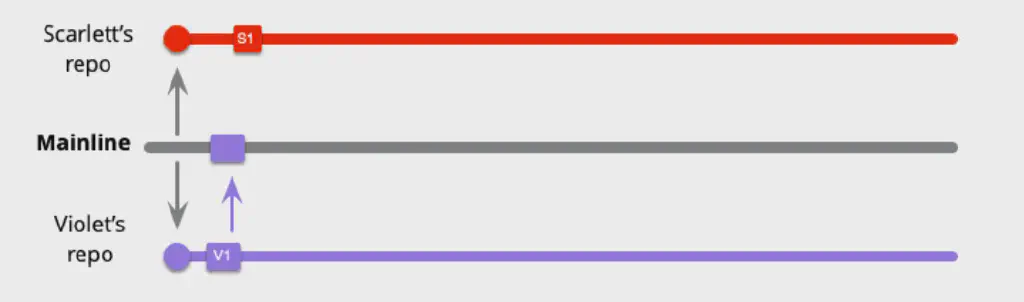 V pushes back to the mainline right after completing the first commit.
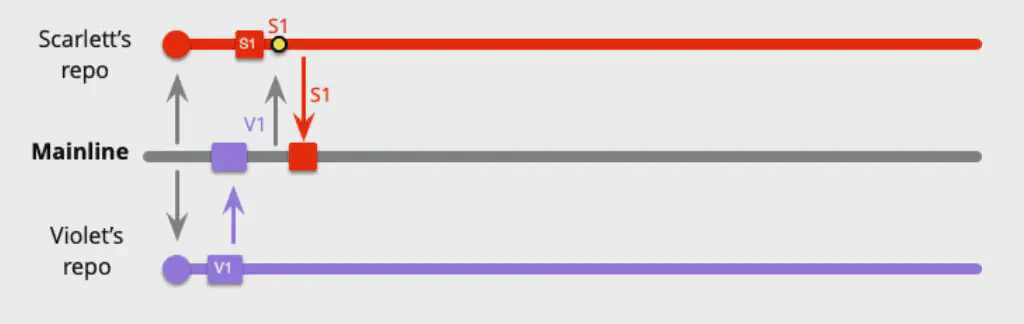 S performs a local merge right after completing the first commit, and pushes back to the mainline.
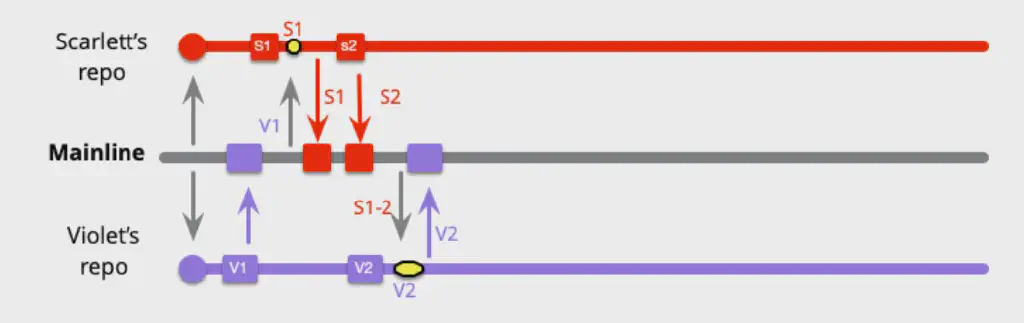 For S’s second push, there are no changes on the mainline, so there is no local merge work.
V completes the second commit and a local merge, then pushes.
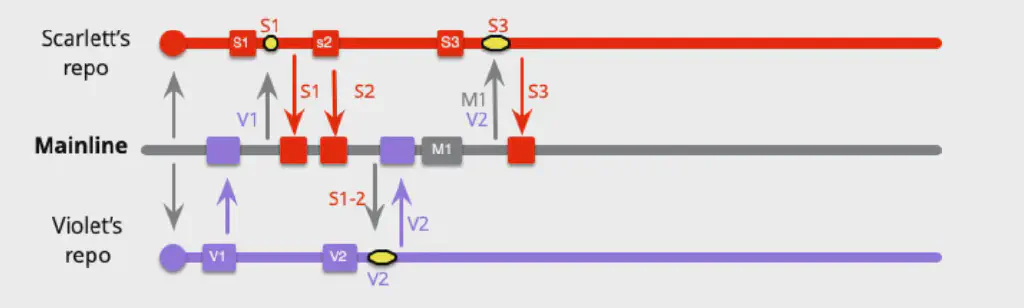 S’s third commit requires a local merge and a push.
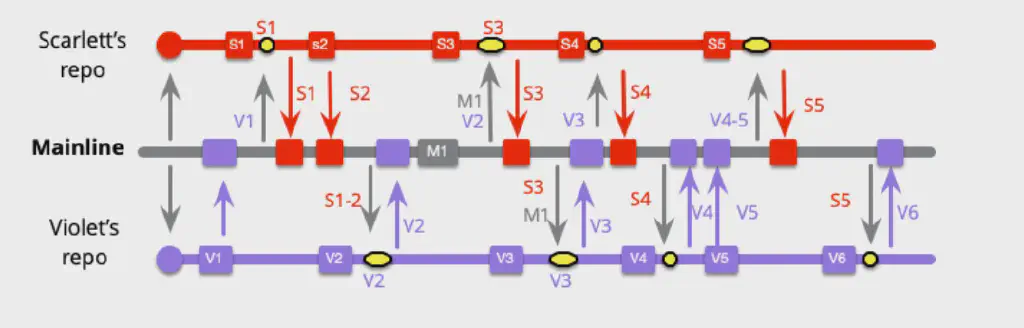 In this way, every local commit is pushed to the mainline.
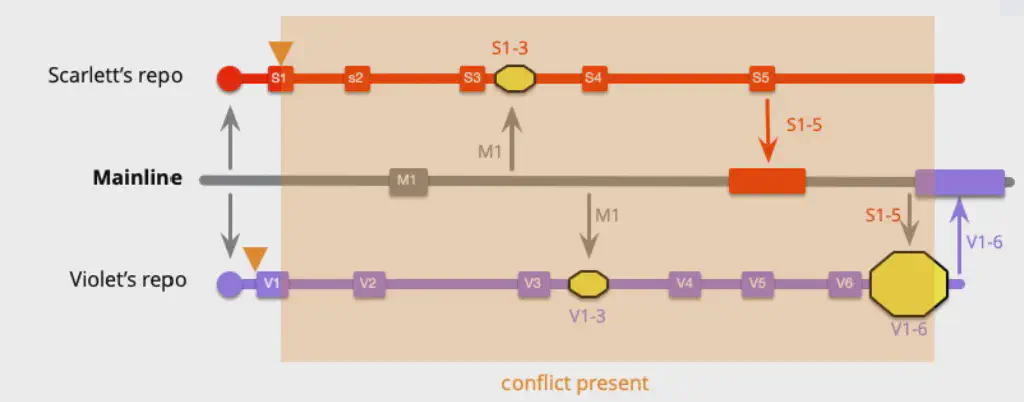
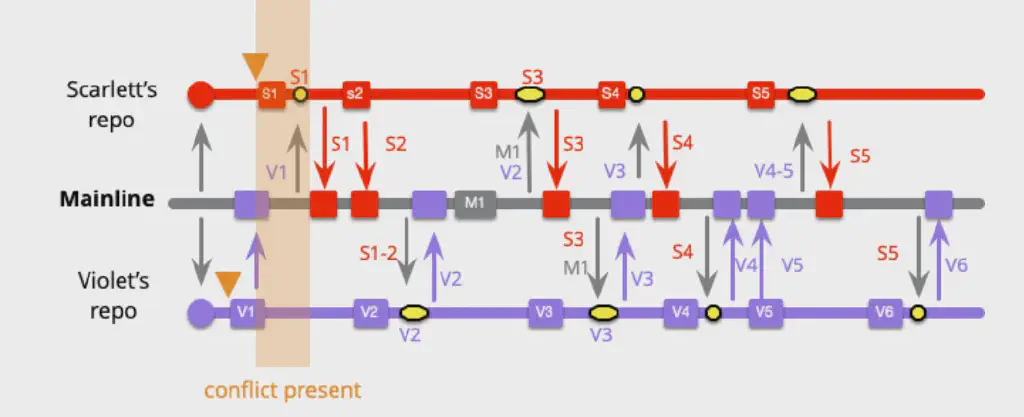
Comparing the two, high-frequency integration involves more local integration work, but the workload of each of these integrations is much lower than that of low-frequency integration. At the same time, more important than the reduced workload is that doing so reduces risk. (Although in most cases a large merge can also be completed smoothly, sometimes there are serious conflict problems that are hard to resolve. In such cases, occasional huge problems are worse than routine small ones.) If each routine integration takes 10 minutes, but 50 integrations combined take 6 hours, it may seem that 6 hours is still less than 500 minutes, but this leads to integration fear (if it hurt, do it more often).
Moreover, under the high-frequency integration model, conflicts between code can be discovered earlier, avoiding the situation where conflicting code is only discovered later, which in the meantime continuously produces a lot of additional conflicting code that should not have existed.
A source control system is actually more of a communication platform, allowing you to be aware of the work of other team members.
Continuous Integration
As soon as a developer completes a healthy commit, they complete mainline integration as quickly as possible, generally within no more than one day.
(If high-frequency integration is more efficient and feasible, but using feature branches means changes are constrained to be no smaller than a feature, then does integration frequency become a problem?)
Continuous Integration - as long as development on a feature is making progress and is healthy, it can be integrated into the mainline. The only rule is that integration must happen every day (or even more frequently).
The development team needs to get used to having unfinished features on the mainline and consider how to avoid exposing these features in the product (by hiding entry points or using configuration control); sometimes we can also implement canary releases.
Under the continuous integration model, developers often do not need to create their own feature branches; they can simply work on the local mainline branch.
The difference between feature branches and continuous integration lies not in whether a feature branch exists, but in when integration into the mainline happens.
A comparison of the two:
The difference between the two patterns depends more on the size of the feature; if a feature is small enough (can be completed within one day), you can practice both feature branches and continuous integration at the same time.
The most obvious problem with feature branches is the workload and uncertainty of merging; however, the bigger problem is that they may prevent refactoring. Refactoring is the most effective way to optimize software, but refactoring creates conflicts, and when the workload of resolving conflicts is too large, refactoring often requires great courage.
| Feature Branch | Continuous Integration |
|---|---|
| - All the code in a feature can be evaluated for quality as a single unit - Feature code is added to the product only after the feature is complete - Lower merge frequency | - Supports integration at a frequency higher than the feature length - Reduces the time to discover conflicts - Smaller merges - Encourages refactoring - Requires commitment to a healthy branch (and thus to self-testing code) - Scientific evidence shows it helps improve software delivery performance |
Feature Branches and Open Source Software
Feature branches on GitHub? The pull request model. Different contexts: distributed, irregular, team members unfamiliar with each other vs. full-time, familiar team members, reliable.
Review of commits
- Code review·
- Integration is blocked
- The importance of modularity
Release Patterns
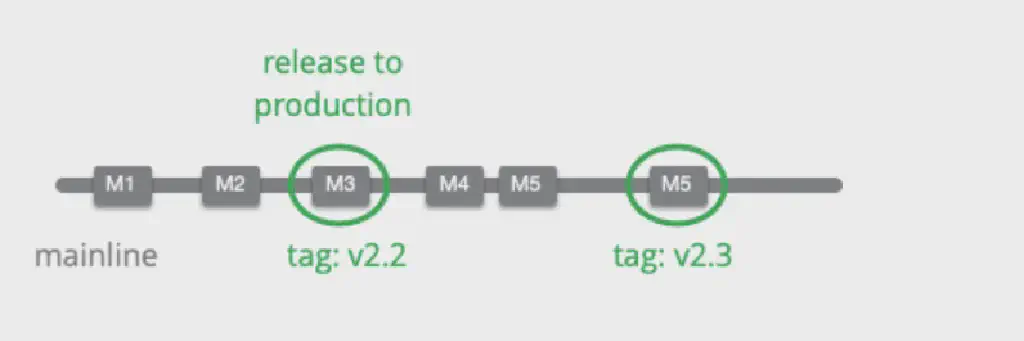
The mainline branch is the active branch, where code is continuously developed. If the mainline can be kept healthy, anyone can start their work from a stable foundation. And if it is healthy enough, the product can also be released directly from the mainline branch.
 For teams practicing CI/CD, a common practice is to track each released version by tagging. But teams that do not practice CD need other release patterns.
Release Branch
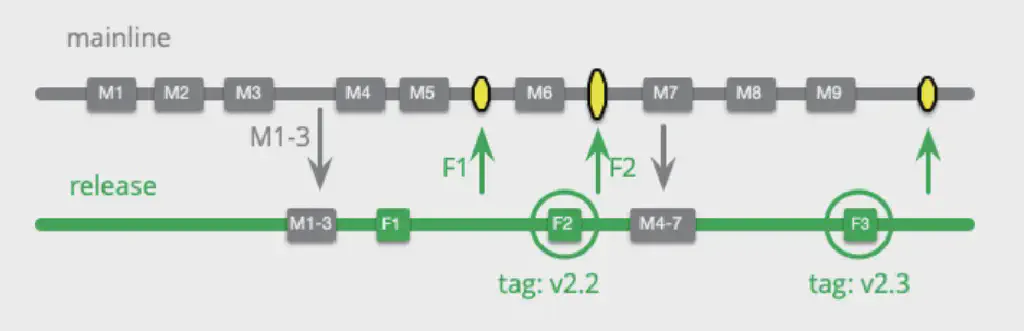
A branch prepared for release that only accepts commits aimed at version stabilization and delivery (generally during the system testing phase).
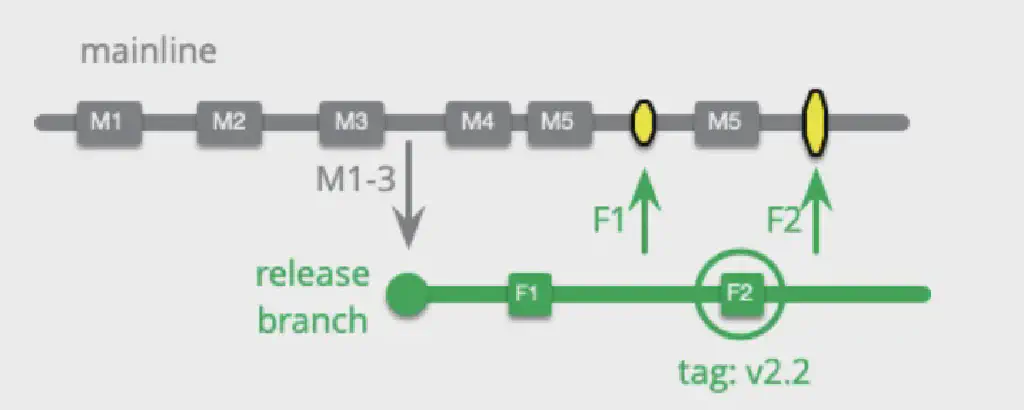
A release branch is pulled from the mainline branch and no longer accepts the merging of any new features. Development work on the release branch mainly consists of fixing discovered bugs or features that affect delivery. All changes eventually still need to be merged back into the mainline.
 Although the work on a release branch is often smaller in workload than developing new features, if development on it takes too long it can still make merging back into the mainline very difficult (the more commits on the mainline, the harder the merge).
In practice, because of the existence of the release branch, the operation of merging back into the mainline is often easily overlooked, especially when there are difficult conflicts to resolve and release pressure exists.
So some developers adopt another approach: continue developing on the mainline, and then use cherry-pick to merge only release-related commits into the release branch. The drawback of this approach is that cherry-pick is often also difficult in many cases (when there are dependencies on previous commits), and there is often some rework on the release branch before the actual release.
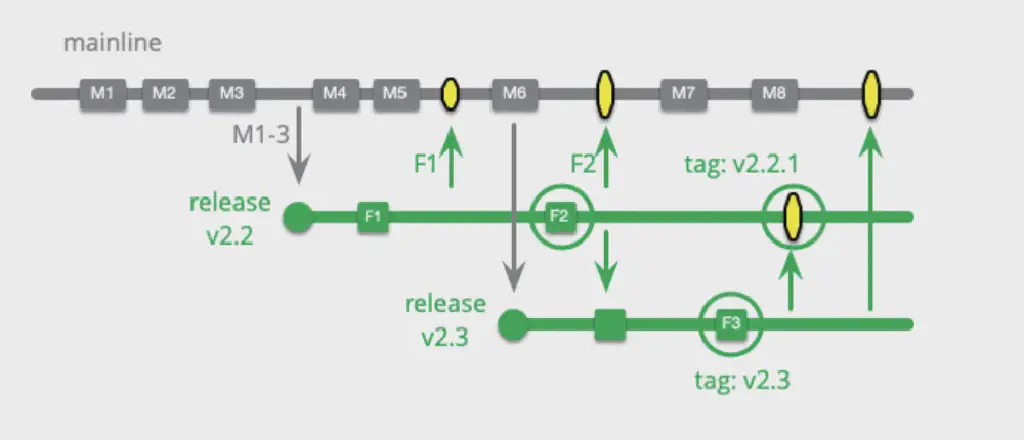 For a team with only one product version, using a single release branch is sufficient. But in many cases there is a need to support multiple product versions; for example, software deployed on a customer’s premises may run on a historical version for a long time, yet still needs ongoing bug fixes or some special requirements. In this case, multiple different release branches need to be maintained and kept in sync with the mainline periodically.
For the development team this clearly greatly increases the maintenance difficulty and workload, but this is more a cost brought about by product strategy. The only thing that can be done is to encourage customers to upgrade to the latest version in a more timely manner (keeping the product stable is critical; once product instability causes problems, it makes customers more inclined to stop upgrading).
Release branches are very necessary for teams that find it difficult to keep the mainline branch continuously healthy; the team can focus on feature validation for product release. But for teams with a single product, release branches are unnecessary; just use the mainline branch and keep it healthy (tag the released versions). In addition, for teams whose release process has many blockers, release branches are also necessary (for example, slow review processes, the launch time windows of app stores, and reviews for security, legal, compliance, etc.).
Maturity Branch
The head of the branch is always marked as the mature code baseline of the most recent version.
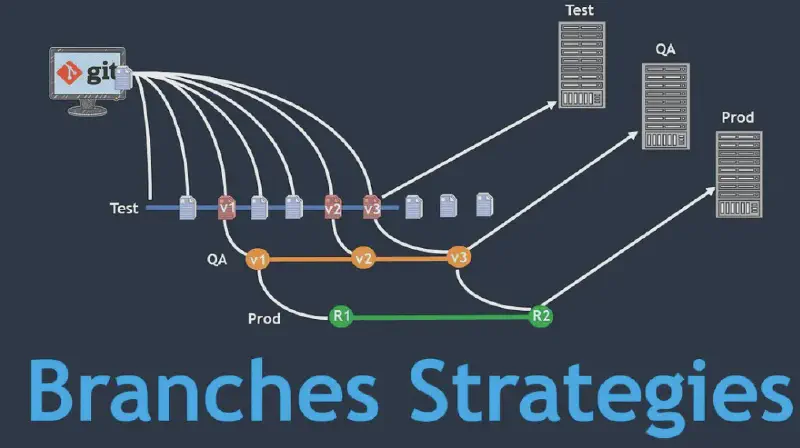
Corresponding maturity branches are pulled out according to the team’s different definitions of product maturity. For example, a QA branch (submitted for testing), a Staging branch (pre-release), and a production branch (live).
But in many cases, a clearly defined tagging mechanism can replace the role of maturity branches. For example, “maturity level - internal build number”, “qa-233”, “prod-445”.
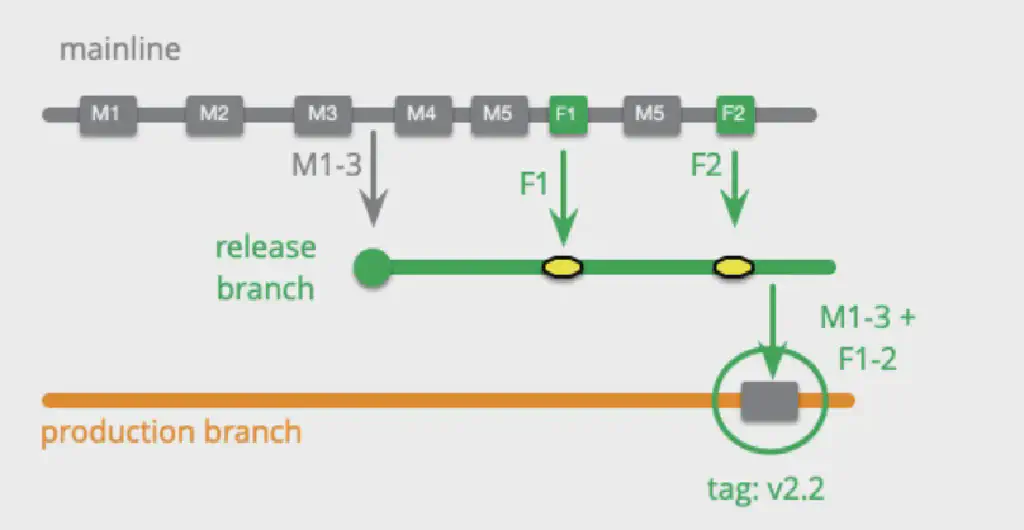
Long-Lived Release Branch
A release branch can generally be deleted after the product is released, but we can also maintain a long-lived release branch. Its role can be seen as a combination of a release branch and a maturity branch. Pre-release fixes are done on this branch and merged back into the mainline, and a release tag is added at the actual release, after which preparation for the next version’s release begins.
Environment Branch
Configure the code’s runtime environment through different commits.
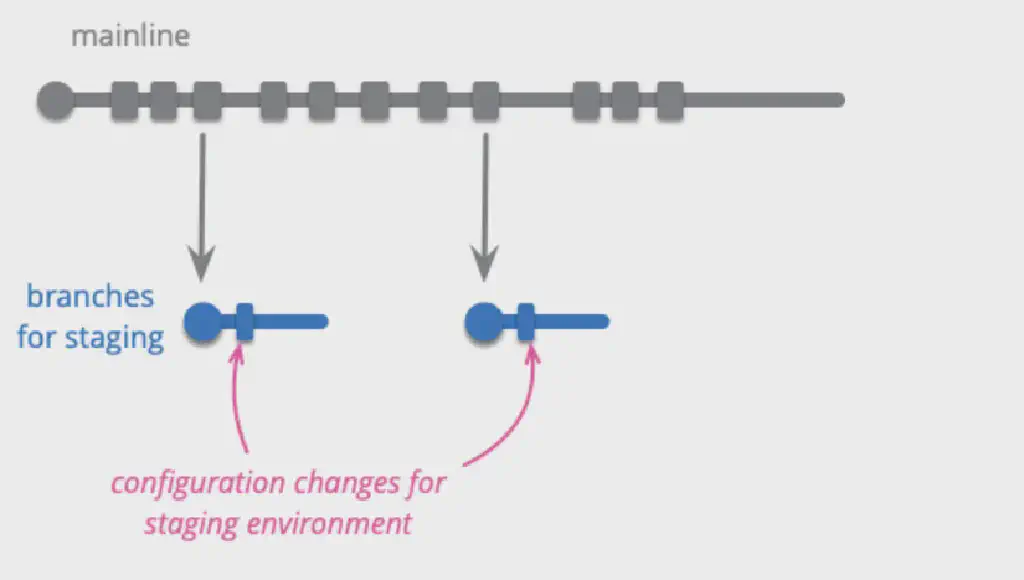
Different product runtime environments often have different configuration code (test environment, development environment, performance verification, security verification environment, pre-release environment, production environment, etc.). Environment branches contain the change commits for these configurations and trigger the corresponding builds and deployments.
Environment branches are generally also used as maturity branches; for example, a QA maturity branch will contain the configuration changes for the QA environment.
However, environment branches are not good practice; having different compiled code for different environments introduces risk. If the product program behaves differently in different environments, it makes fixing and locating problems extremely difficult. So it is best to ensure that the executable code running in different environments is identical, and that environment configurations are all controlled through explicit configuration files or variables. Any changes caused by environment changes should not be included in the source control system.
Environment branches should only exist as an emergency mechanism for teams that lack such an environment-switching control mechanism.
Hotfix
A branch used for urgent product failure fixes.
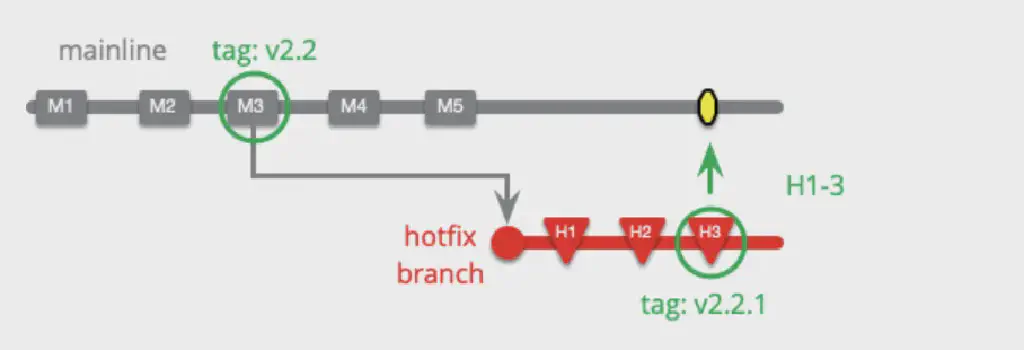 Pull a hotfix branch from the release version corresponding to the mainline branch, and merge it back into the mainline after completion (if the release was a long time ago, the merge work may be considerable).
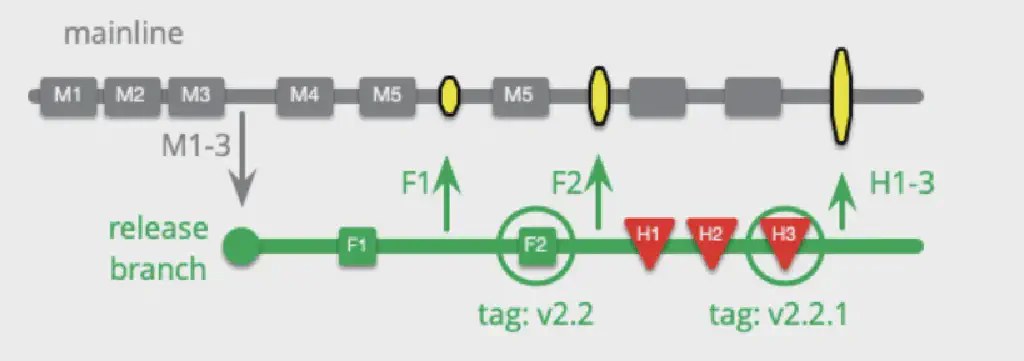 For teams using release branches, a hotfix can also be done directly on the release branch, which is equivalent to turning the original release branch into a hotfix branch.
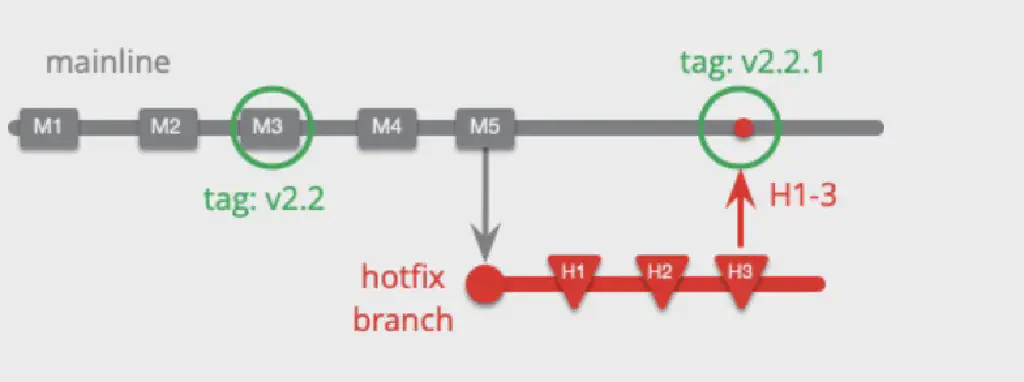 For teams practicing CD, a hotfix can even be completed directly on the mainline (a hotfix branch is still pulled, but from the latest commit), because such teams generally already have the ability to keep unreleased features hidden. Moreover, during the hotfix process, no new commits to the mainline are allowed. (Hotfix takes priority.)
How to define a hotfix? For teams that can release frequently, issues can generally be folded into the regular release cadence without needing a hotfix. It depends on the team’s release frequency and the actual impact on the business.
Release Train
Like a train departing on schedule, there are regular release intervals; after a feature is complete, you choose which release to put it into (this is not the same concept as SAFe’s Agile Release Train, which is more of an organizational-level practice).
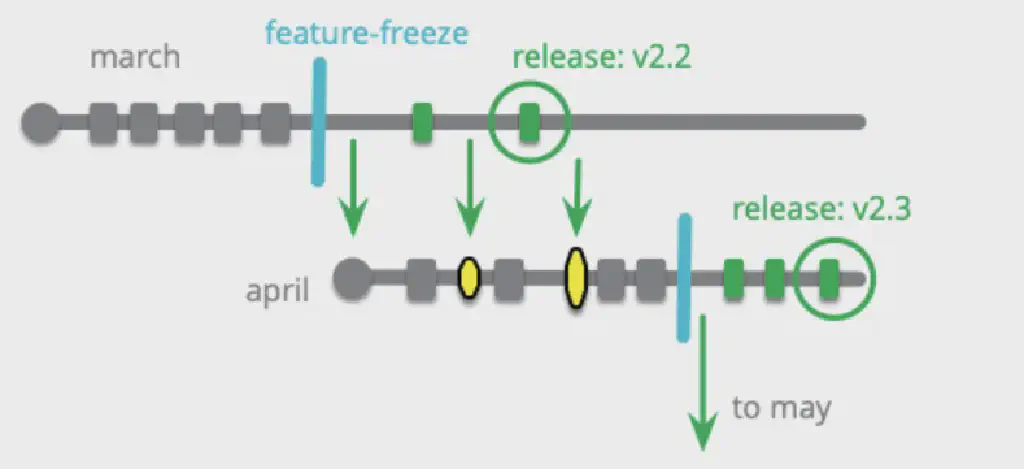 The team defines a regular release plan and determines the features on each release train, making commitments and arranging their respective work tasks accordingly. Once the train departs, the current branch turns into a release branch and will only accept bug fixes. Release trains are generally used together with feature branches. For teams with many blockers in the release process, the release train is very useful, because these blockers will not affect the development of subsequent features.
But the fairly obvious drawback is that if a feature is completed very early, it still has to wait until the departure time to go live.
The release train can be seen as a way to improve a team’s release process. For teams that find it hard to release stably, implementing CD is often not realistic; in that case, the release train is a good choice.
Loading Future Trains
Instead of loading requirements onto a new train only after the old train has departed, a variant of this pattern can be used. If it is uncertain whether some features can be completed before the scheduled departure, two trains can be opened at the same time (with different expected departure times); development work completed on the March train is also committed to the April train, and after the March train departs, the remaining work continues on the April train.
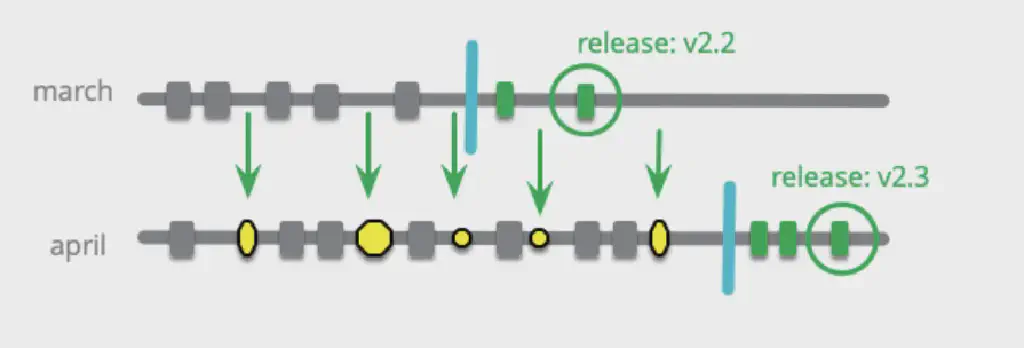 This pattern allows work on the April train to not affect the March train, but the drawback is that if changes on the April train affect the March features, it will make the subsequent merge work more complex.
Comparison with Mainline Release
The main benefit of the release train is having a regular product release calendar, but multiple branches still introduce complexity.
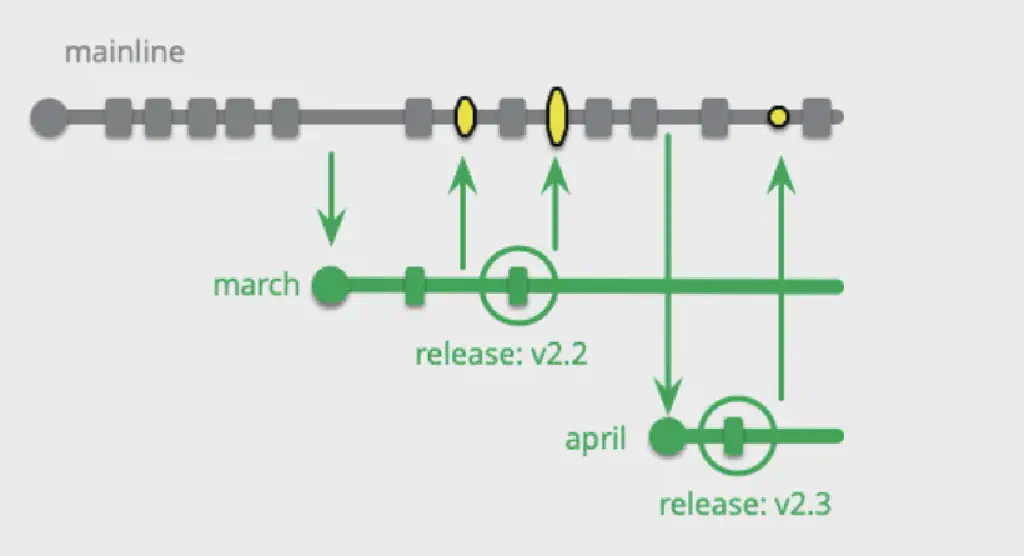
In fact, the mainline pattern can work this way too: develop on the mainline, and once the release date arrives, simply add a corresponding release branch.
Release-Ready Mainline
Ensure the mainline is in an absolutely healthy state, and that the head of the mainline can always be released directly to the production environment. (Every commit is healthy enough to be released directly, but only the commits that are actually released need to be tagged.)
Other Release Patterns
Experimental Branch
Collect work used for experiments on the codebase; these features will not be merged directly into the production environment.
Experimental ideas Different ways of implementing a feature
Future Branch
A branch for changes that are too invasive to other branches.
A rarely used pattern that only pulls from the mainline and never merges back into other branches. Once used, it means there is an independent code enclave within the team. The lifetime of this branch should be kept as short as possible.
Collaboration Branch
Used for collaborative work between developers in situations where no formal integration is needed.
Team Integration Branch
Allow sub-teams to integrate with each other before integrating into the mainline. (Large projects.)
Original reference: Martin’s blog Branch Patterns